
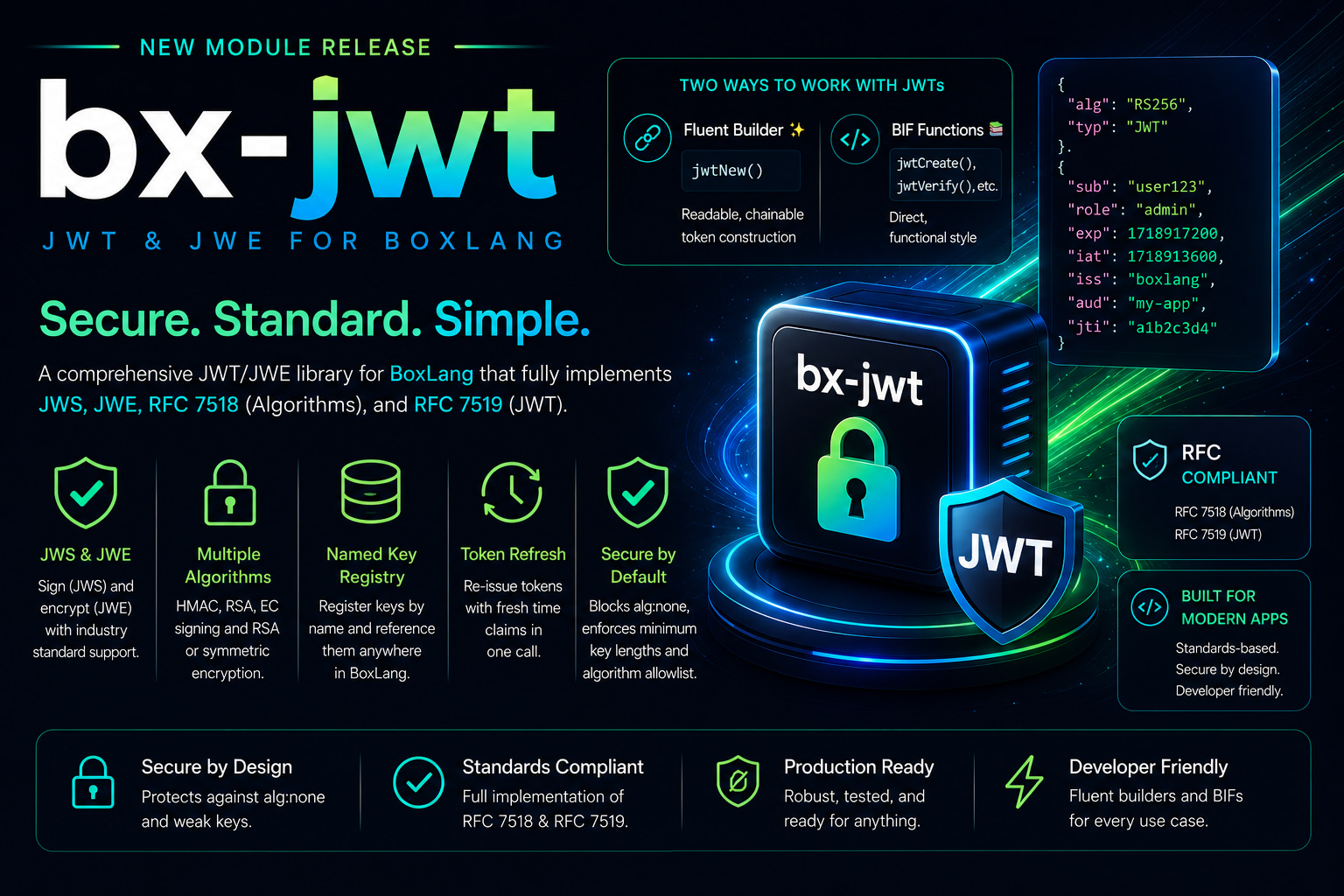
JWT authentication is everywhere. But rolling it correctly — with proper algorithm enforcement, key management, clock skew handling, JWE encryption, and zero security footguns — is anything but trivial. Today, we're shipping bx-jwt, a production-ready JWT/JWE module for BoxLang that handles all of it out of the box, so you can focus on building, not fighting cryptography.
bx-jwt is part of the BoxLang+ and BoxLang++ subscription tiers — our enterprise-grade module collection built for teams that take security seriously.
What is bx-jwt?
bx-jwt is a full implementation of the JWT/JWE specification stack for BoxLang:
- JWS (JSON Web Signature) — HMAC, RSA, and Elliptic Curve signing
- JWE (JSON Web Encryption) — RSA and symmetric encryption
- RFC 7518 — JSON Web Algorithms
- RFC 7519 — JSON Web Token
It ships with two APIs that serve different tastes: a fluent builder for expressive, chainable token construction, and a suite of BIF functions for direct, functional-style usage. Both share the same engine, key registry, and security model.
Two APIs, One Module
The Fluent Builder — jwtNew()
When readability matters, the fluent builder gives you a clean, chainable surface for token construction. Call jwtNew() and chain your claims. Terminate with .sign() or .encrypt().
token = jwtNew()
    .subject( "user-123" )
    .issuer( "auth-service" )
    .audience( "mobile-client" )
    .claim( "roles", [ "admin", "user" ] )
    .expireIn( 3600 )
    .header( "kid", "v1" )
    .sign( secret, "HS256" );
Every standard claim has a named method. Custom claims go through .claim( key, val ). Headers via .header( key, val ). Swap .sign() for .encrypt() and you have a JWE. It reads like what it does. 🎯
The BIF Functions
For teams that prefer a direct, functional style, all operations are available as first-class BoxLang BIFs:
| BIF | Purpose |
|---|---|
jwtCreate() | Sign a payload struct into a compact JWS token |
jwtVerify() | Verify signature and validate claims — throws on failure |
jwtValidate() | Like jwtVerify() but returns true/false |
jwtDecode() | Inspect header/payload without signature verification |
jwtRefresh() | Re-issue a token with fresh iat, jti, and optional new exp |
jwtEncrypt() | Encrypt a payload as a compact JWE token |
jwtDecrypt() | Decrypt a JWE token and return claims |
jwtGenerateSecret() | Cryptographically random HMAC secret (Base64-encoded) |
jwtGenerateKeyPair() | RSA or EC key pair as PEM strings |
Get Started in Seconds
HMAC Sign and Verify
secret  = jwtGenerateSecret( 256 );
token   = jwtCreate( { sub: "user-123", iss: "my-api", roles: [ "admin" ] }, secret, "HS256" );
payload = jwtVerify( token, secret, "HS256" );
writeOutput( payload.sub ); // user-123
RSA Sign and Verify
keys    = jwtGenerateKeyPair( "RS256" );
token   = jwtCreate( { sub: "user-123" }, keys.privateKey, "RS256" );
payload = jwtVerify( token, keys.publicKey, "RS256" );
JWE Encryption
Sensitive payloads — PII, PHI, internal claims that must stay opaque — belong in a JWE, not a JWS. bx-jwt handles both:
token   = jwtEncrypt(
    { sub: "patient-456", phi: { dob: "1990-01-15" } },
    secret32bytes,
    { keyAlgorithm: "dir", encAlgorithm: "A256GCM" }
);
payload = jwtDecrypt( token, secret32bytes, { keyAlgorithm: "dir", encAlgorithm: "A256GCM" } );
Or nest them — sign first, encrypt the signed token — for the full sign-then-encrypt pattern:
// Inner signed JWT
signedToken = jwtCreate( { sub: "u1", role: "admin" }, innerPrivKey, "RS256", {
    headers: { cty: "JWT" }
} );

// Outer encrypted JWE
encryptedToken = jwtEncrypt( signedToken, outerPubKey, {
    keyAlgorithm : "RSA-OAEP-256",
    encAlgorithm : "A256GCM"
} );
Enterprise Key Management with the Key Registry
This is where bx-jwt separates from basic JWT libraries. The Key Registry lets you define named keys once in configuration and reference them by name throughout your entire application. Keys never appear in application logic. Rotation is a config change, not a code change.
// ModuleConfig.bx
settings = {
    keys: {
        "api-signing": {
            algorithm : "HS256",
            secret    : "${Setting: env.JWT_HMAC_SECRET not found}"   // env var substitution built-in
        },
        "api-rsa": {
            algorithm  : "RS256",
            privateKey : "/etc/keys/api-private.pem",
            publicKey  : "/etc/keys/api-public.pem"
        },
        "partner-public": {
            algorithm : "RS256",
            publicKey : "/etc/keys/partner-public.pem"  // verify-only key
        }
    },
    defaultSigningKey : "api-signing",
    defaultVerifyKey  : "api-signing",
    defaultAlgorithm  : "HS256",
    defaultIssuer     : "my-api",
    defaultAudience   : "web",
    defaultExpiration : 3600,
    generateIat       : true,
    generateJti       : true
}
With defaults fully configured, the key and algorithm arguments become optional everywhere:
// No key argument, no algorithm argument — resolved from registry
token   = jwtCreate( { sub: "user-123" } );
payload = jwtVerify( token );
Keys can also be registered at runtime via the JWTService:
jwtService = getBoxContext().getRuntime().getGlobalService( "JWTService" );
jwtService.registerKey( "session-key", { algorithm: "HS256", secret: generateSecureKey() } );
Security by Default — Not by Configuration 🛡️
bx-jwt is built with the attack surface in mind. Security properties are unconditional — they cannot be turned off:
alg:none Rejection
The classic JWT attack. bx-jwt unconditionally rejects tokens with alg:none. Passing an unsigned token to jwtVerify() or jwtRefresh() always throws JWTVerificationException. No configuration switch, no override. It simply doesn't work.
HMAC Minimum Key Lengths (RFC 7518 §3.2)
Short HMAC secrets are a real-world vulnerability. bx-jwt enforces RFC 7518 minimums:
| Algorithm | Minimum Key Length |
|---|---|
| HS256 | 32 bytes (256 bits) |
| HS384 | 48 bytes (384 bits) |
| HS512 | 64 bytes (512 bits) |
Use jwtGenerateSecret( bits ) and you're always compliant.
Algorithm Allowlist
Algorithm-confusion attacks exploit servers that accept any algorithm the token header declares. Lock your application to a known set:
// Only HS256 and RS256 are accepted — anything else throws
allowedAlgorithms: [ "HS256", "RS256" ]
Clock Skew Tolerance
Distributed systems have clock drift. bx-jwt ships with a configurable clockSkew (default: 60 seconds) that prevents legitimate tokens from failing exp/nbf validation due to minor time differences between services. Tune it per environment:
// Strict environment
payload = jwtVerify( token, secret, "HS256", { clockSkew: 0 } );

// Distributed system with known drift
payload = jwtVerify( token, secret, "HS256", { clockSkew: 120 } );
Real-World Patterns
Authentication Middleware
function requireAuth() {
    var authHeader = getHttpRequestData().headers[ "Authorization" ] ?: ""
    if ( !authHeader.startsWith( "Bearer " ) ) {
	    bx:header statusCode=401;
        abort;
    }

    var token = authHeader.removeFirst( "Bearer " )

    if ( !jwtValidate( token, application.jwtSecret, "HS256" ) ) {
        bx:header statusCode=401;
        abort;
    }

    request.currentUser = jwtVerify( token, application.jwtSecret, "HS256", {
        claims: { iss: "auth-service", aud: "api" }
    } );
}
Token Refresh with Grace Period
function refreshToken( token ) {
    try {
        return jwtRefresh( token, application.jwtSecret, "HS256", {
            allowExpired : true,   // honor recently expired tokens
            expireIn     : 3600,
            claims       : { iss: "auth-service" }
        } );
    } catch ( "bxjwt.JWTVerificationException" e ) {
        // Bad signature — not refreshable
        return "";
    }
}
Kid-Based Key Rotation
function verifyWithKeyRotation( token ) {
    var decoded = jwtDecode( token );
    var kid     = decoded.header.kid ?: "default";
    var key     = getKeyForKid( kid );
    return jwtVerify( token, key, decoded.header.alg );
}
Full Algorithm Support
Signing (JWS)
| Algorithm | Type | Notes |
|---|---|---|
| HS256, HS384, HS512 | HMAC | Symmetric |
| RS256, RS384, RS512 | RSA | Asymmetric — private signs, public verifies |
| ES256, ES384, ES512 | Elliptic Curve | Smaller keys than RSA, equivalent security |
Encryption (JWE)
| Key Algorithm | Content Encryption | Key Type |
|---|---|---|
| RSA-OAEP-256 | A256GCM | RSA key pair |
| dir | A256GCM | 256-bit symmetric secret |
Installation
# CommandBox
box install bx-jwt

# BoxLang CLI
install-bx-module bx-jwt
bx-jwt requires a BoxLang+ or BoxLang++ subscription. 🔑
This module ships as part of our enterprise module collection — a growing library of production-ready, security-focused, professionally maintained modules available exclusively to BoxLang+ subscribers.
BoxLang+/++/Starter
bx-jwt is one of many enterprise modules available under BoxLang+/++/Starter. When you subscribe, you get:
- 🔐 bx-jwt and the full enterprise module library
- ⚡ Priority support from the Ortus team
- 🏗️ Access to upcoming enterprise modules as they ship
- ❤️ You fund the continued development of BoxLang as a community-supported open source project
View Plans & Subscribe → boxlang.io/plans
Resources
JSON Web Tokens are a solved problem. Now BoxLang has the enterprise solution to prove it. Install bx-jwt, protect your applications, and ship with confidence. 🚀


Add Your Comment