
Ortus Solutions today announces that bx-mcp, the Model Context Protocol (MCP) server for BoxLang, is now free for everyone. Install it, point any MCP capable client at it, and your AI coding assistant, IDE agent or automation pipeline can inspect and operate a live BoxLang runtime: JVM, caches, datasources, slow requests, schedulers, logs and more. No BoxLang+ subscription required unless you want professional support 🤪 and help support the futher development of all our open-source initiatives.
bx-module install bx-mcp
That is the whole install. Seconds later, your runtime speaks MCP. 🚀
Free, and what that means
We want to be precise about this one:
- Free of charge. No license fee, no BoxLang+ subscription.
- Proprietary, not open source. The module ships with its own license, included in the distribution.
- Requires
bx-ai. The MCP server registers itself with the BoxLang AI module. - No support commitment in the free license. Need production support, architecture reviews or training? Talk to Ortus.
Agents that can see are agents that can help
An agent that can write BoxLang code but cannot see your running server is guessing about production. BxMCP closes that gap. When it is enabled, the module registers a boxlang MCP server and exposes an HTTP endpoint at /~bxmcp/boxlang.bxm. Clients talk to it with JSON-RPC 2.0 to list tools, call them, fetch prompts and read resources.
Ask your agent "why is my server slow?" and it stops speculating. It calls tools, reads real numbers and tells you what it found.
What you get
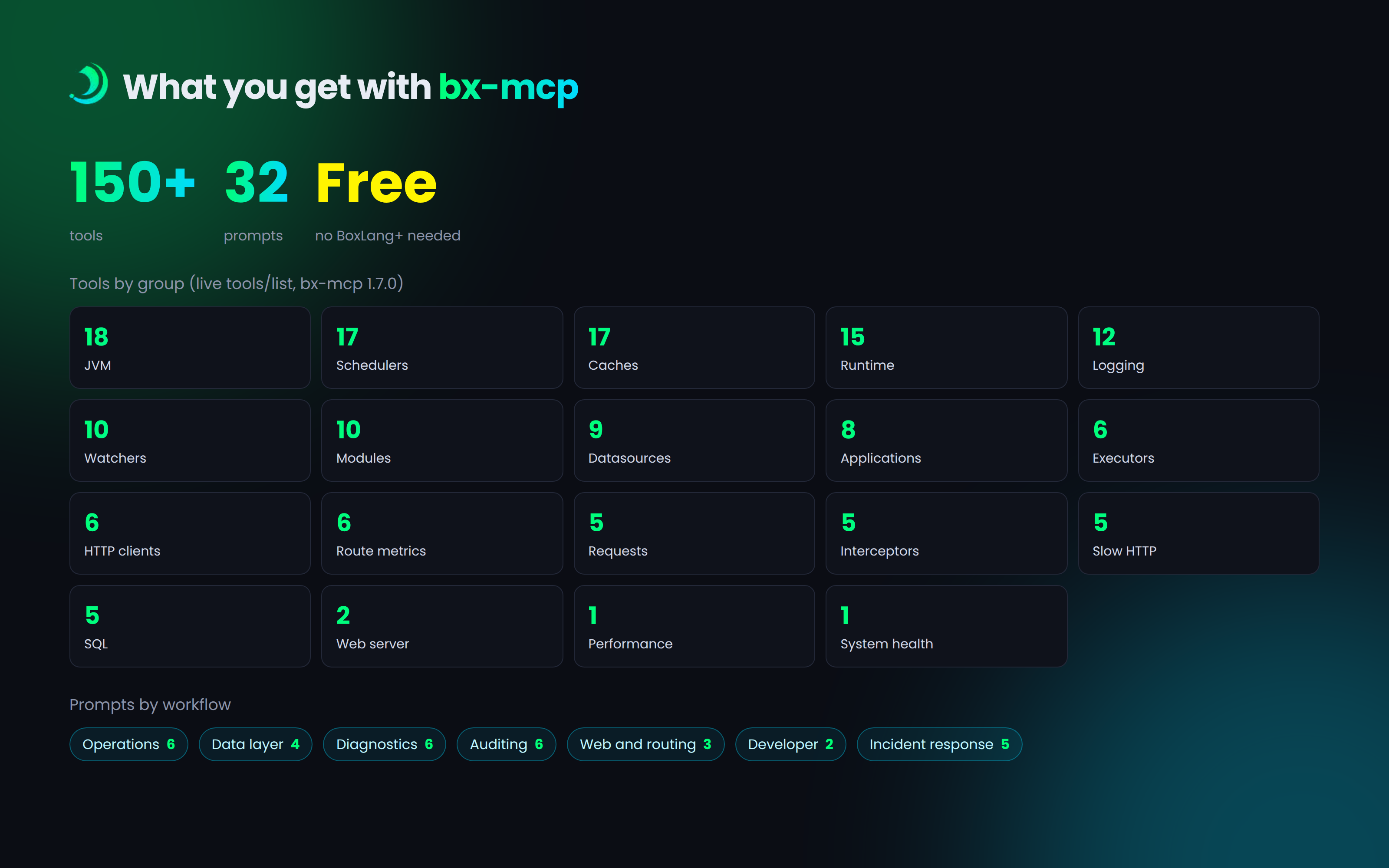
150+ tools across the runtime, each one discovered automatically:
- 🔍 Runtime introspection: BoxLang version, live configuration, BIFs, components, global services
- 💻 JVM diagnostics: heap and memory pools, GC, thread dumps, hot threads, top allocators, deadlock detection, heap dumps for offline analysis, file descriptors and disk usage
- 🗄️ Data layer: cache analytics, datasource pool metrics and connection tests, connection pool latency histograms, slow SQL capture
- 🌐 HTTP and web: HTTP and SOAP client stats, slow outbound call capture, slow request analysis, per route p50/p95/p99 metrics, Undertow diagnostics
- ⚡ Operations: async executors, schedulers, modules, interceptors, applications, logging and file watchers
Structured health reports. Every health tool returns the same shape: a status, a score from 0 to 100, and a list of issues with stable codes and a suggested action. The aggregate system_get_health tool checks datasources, caches, watchers, schedulers, executors and the web server in a single round trip, and the overall score follows the weakest subsystem. Agents can rank, filter and reason about it programmatically.
{
  "status": "warning",
  "score": 50,
  "issues": [
    {
      "code": "webServer:WEB_QUEUE_HIGH",
      "severity": "critical",
      "message": "Worker queue depth is high: 10 queued tasks",
      "suggestedAction": "Increase worker threads; the server is falling behind on request processing."
    }
  ]
}
32 prompts that tell an agent which tools to call, and in what order, for common workflows: runtime_health_check, full_system_audit, slow_sql_diagnosis, cpu_profiling, deployment_validation, and a full incident response set with incident_triage, cascade_failure_diagnosis, rollback_decision and post_incident_review.
An interactive CLI. Prefer a terminal to an agent? The module ships a shell client with tab completion, run, prompt and a watch mode that polls a tool every few seconds:
boxlang bxmcp http://localhost:8080/~bxmcp/boxlang.bxm --token=your-auth-token
Install it in two minutes
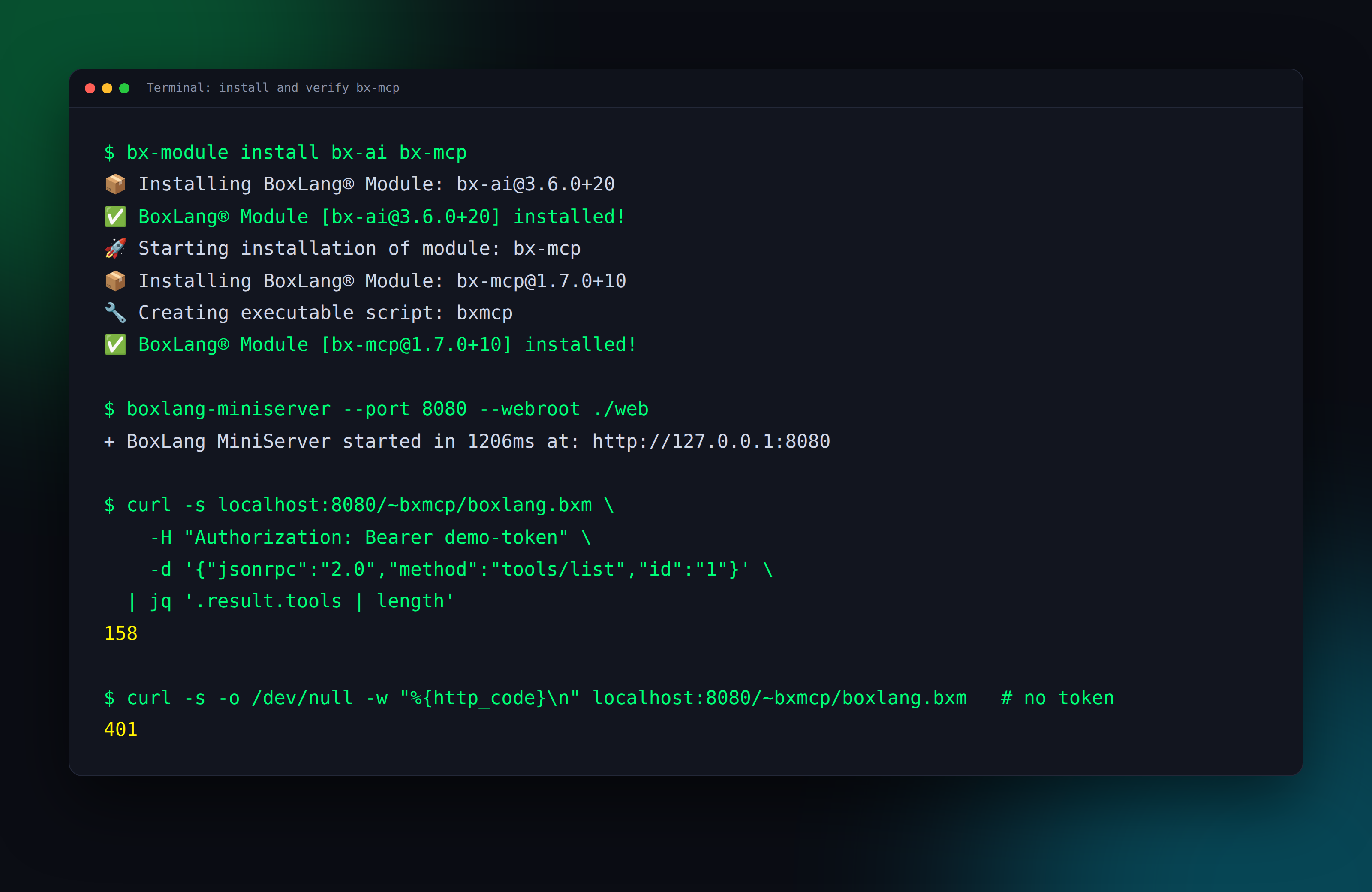
You need BoxLang 1.14+ and the bx-ai module. Install both with the BoxLang module manager:
bx-module install bx-mcp
On a CommandBox server, use box install bx-mcp instead.
Next, set a token. BxMCP is locked to localhost by default, and a token is strongly recommended for anything else. Add this to your boxlang.json:
{
	"modules": {
		"bxmcp": {
			"settings": {
				"authToken": "my-secret-token",
				"allowedIPs": [ "127.0.0.1" ]
			}
		}
	}
}
Start your server and verify it. The first call lists the tools. The second shows the server turning away a client with no token:
curl -s http://localhost:8080/~bxmcp/boxlang.bxm \
  -H "Content-Type: application/json" \
  -H "Authorization: Bearer my-secret-token" \
  -d '{"jsonrpc":"2.0","method":"tools/list","id":"1"}' | jq '.result.tools | length'

curl -s -o /dev/null -w "%{http_code}\n" http://localhost:8080/~bxmcp/boxlang.bxm \
  -H "Content-Type: application/json" \
  -d '{"jsonrpc":"2.0","method":"tools/list","id":"1"}'
# 401
Connect your agent
Any MCP client that supports HTTP servers will do. For Claude Desktop, Cursor and similar clients:
{
	"mcpServers": {
		"boxlang": {
			"url": "http://localhost:8080/~bxmcp/boxlang.bxm",
			"headers": {
				"Authorization": "Bearer my-secret-token"
			}
		}
	}
}
In VS Code, put the same block in .vscode/mcp.json. The bx-mcp docs cover VS Code, Claude Desktop and Cursor setups.
Watch an agent work
Screenshots of dashboards are easy. So we ran a real test: a BoxLang MiniServer with a deliberately abusive demo app (fast, slow, database, outbound HTTP, cache and error routes), 24 concurrent clients hammering it, and an AI agent connected to bx-mcp. The numbers below come from that run. It is a stress demo, not a benchmark.
First question: "Is my BoxLang server healthy? Users say it feels slow." The agent called system_get_health and undertow_get_stats:
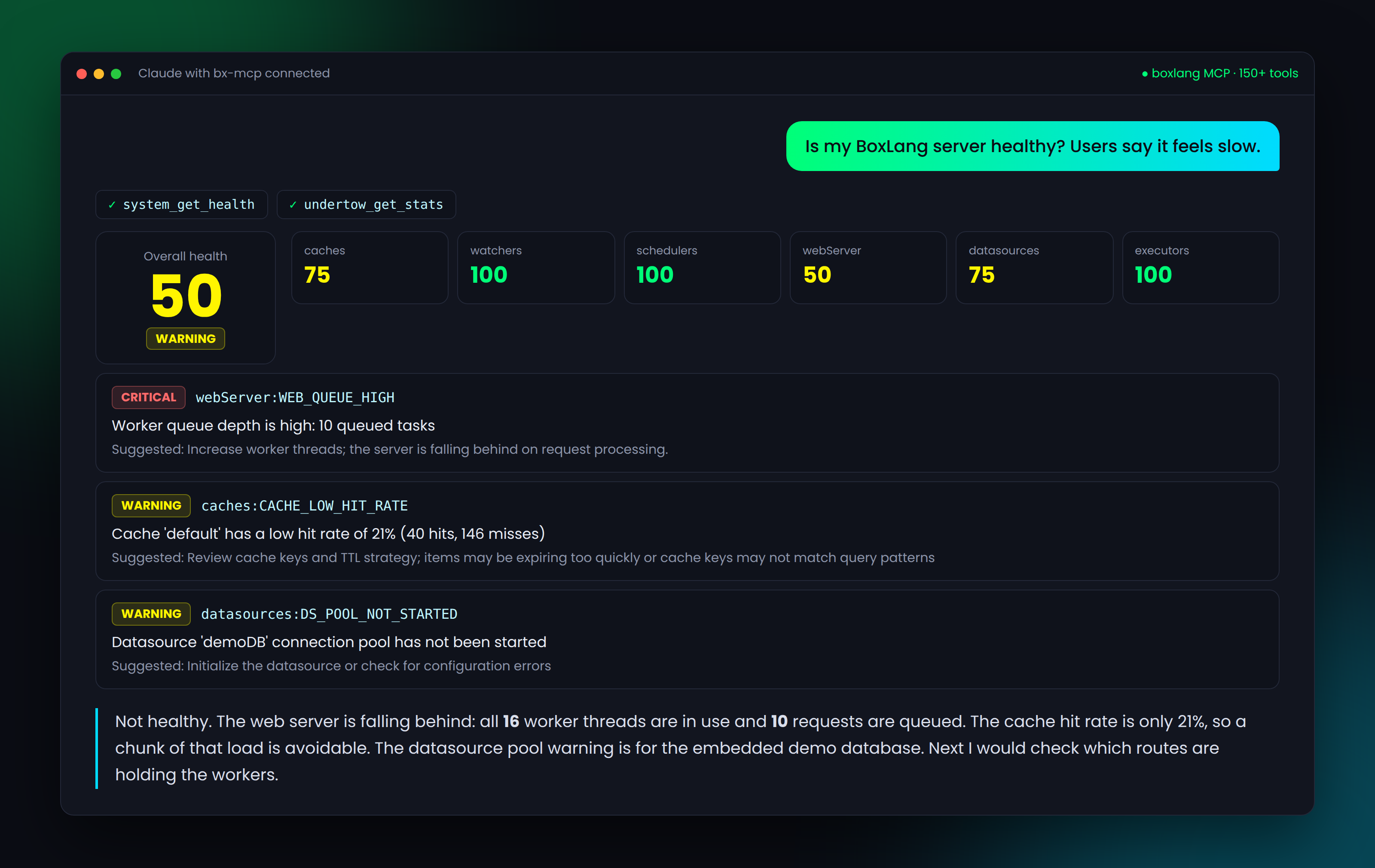
The overall score was 50. The web server score dragged it down: all 16 worker threads were busy with 10 requests queued, flagged critical with a suggested action. The agent also spotted a 21% cache hit rate, which meant avoidable load. It did not guess at any of this. Every claim came from a tool result.
Second question: "Which routes are the problem?" The agent called routes_get_all, sql_get_query_stats, slow_http_get_stats and requests_get_stats:
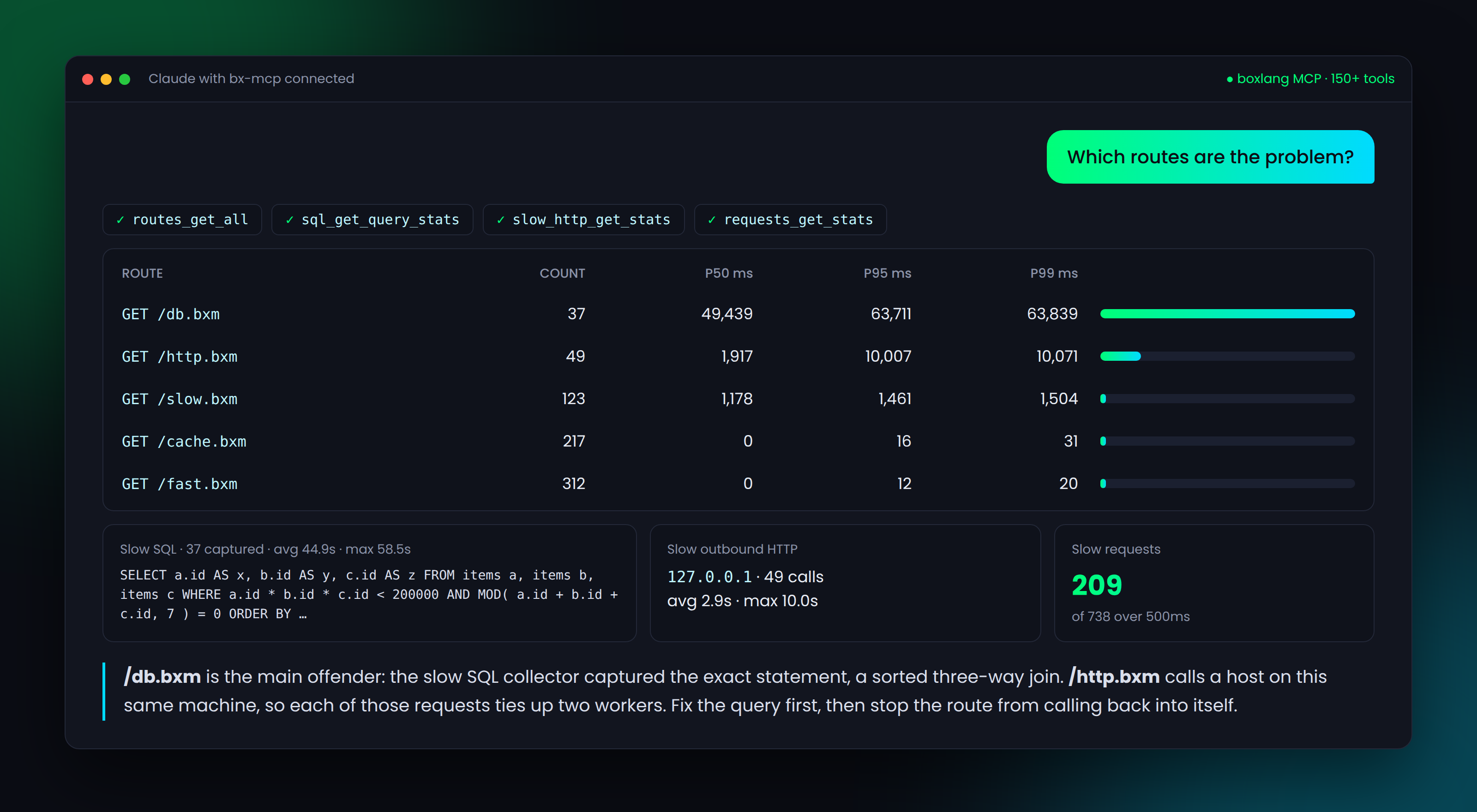
Per route percentiles pointed straight at /db.bxm. The slow SQL collector had captured the exact statement behind it, and the slow HTTP collector showed that /http.bxm was calling a host on the same machine, tying up two workers per request. 209 of 738 requests crossed the slow request threshold. In one conversation, the agent went from "feels slow" to "fix this query, then stop this route from calling itself."
Lock it down
BxMCP can restart applications, reload modules, clear caches and trigger GC. You decide who gets which tools:
- Bearer tokens, one or many, each with its own tool access
- Security profiles: the built in
adminprofile allows everything, andreadonlyallows only get, has, search and read tools. Define your own, too - Glob patterns in
includedToolsandexcludedTools, such asjvm*orcache_get* - IP allowlisting (localhost only by default) and CORS origins
{
	"modules": {
		"bxmcp": {
			"settings": {
				"securityProfiles": {
					"jvm-only": {
						"includedTools": [ "jvm*", "runtime_get_info" ],
						"excludedTools": [ "jvm_trigger_gc", "jvm_trigger_heap_dump" ]
					}
				},
				"authToken": [
					{ "token": "agent-token", "profile": "readonly" },
					{ "token": "ops-token", "profile": "jvm-only" },
					{ "token": "admin-token", "profile": "admin" }
				]
			}
		}
	}
}
Our advice: give your agents the readonly profile in production, and keep admin for humans.
Extend it with your own tools
The built in tools are only the start. Any module or application can register its own tools and prompts into the same server using the mcpServer() BIF from bx-ai:
mcpServer( "boxlang" ).registerTool(
	aiTool(
		"check_deployment_status",
		"Check the current deployment status of the application",
		( environment ) => {
			var status = deploymentService.getStatus( environment )
			return {
				environment : environment,
				version     : status.version,
				deployedAt  : status.deployedAt.toString(),
				healthy     : status.healthy
			}
		}
	).addParameter(
		aiToolParam( "environment", "string", "The deployment environment to check (e.g., staging, production)" ).required()
	)
)
Register tools in your onApplicationStart or your module's onLoad, and they are available the moment the MCP server is. You can also scan a package for methods annotated with @mcpTool.
BxLens: the observability platform for BoxLang
BxMCP gives your agents a window into the runtime. BxLens is our observability platform for BoxLang: a debug bar for every request and an ops console for your servers, covering requests, queries, HTTP calls, mail, errors, the JVM, logs and AI agent runs. It is free for one server.
BxMCP can tap into BxLens, and talking to BxLens over MCP is coming soon. Observability for humans and agents, from the same platform. 👀
Get started
Requirements: BoxLang 1.18+, Java 21 and the bx-ai module.
bx-module install bx-mcp
Install it, set a token, connect your agent, and ask it how your server is doing. Then tell us what you want to see next in the Ortus Community Slack.
Resources
- bx-mcp docs: boxlang.ortusbooks.com/boxlang-ai/bx-mcp
- ForgeBox: forgebox.io/view/bx-mcp
- BxLens: bxlens.boxlang.io
- BoxLang AI: ai.boxlang.io
- BoxLang: boxlang.io | BoxLang docs
- Community: Ortus Community Slack
- Professional support and consulting: ortussolutions.com/services
Your agents can write the code. Now they can see how it runs.




Add Your Comment