


We are so excited to bring you a minor but huuuge release for FORGEBOX and all of its editions. Here are the major updates for this release and the full release notes.
Major Updates
ColdBox 6
We have made the upgrade and forgebox.io is now fully powered by ColdBox 6.1.0. This was a major upgrade to our entire framework engine and we are reaping the so many benefits of the ColdBox release. From async operations, to major rendering improvements. The entire logging enhancements on its own have rendered a 2x performance boost for API calls. We have also analyzed our traffic data and our page rendering has increased by 27% due to the ColdBox 6 Rendering capabilities. These are significant boosts in performance and stability just by the underlying framework on itself. Great job ColdBox Team!
CBSecurity 2
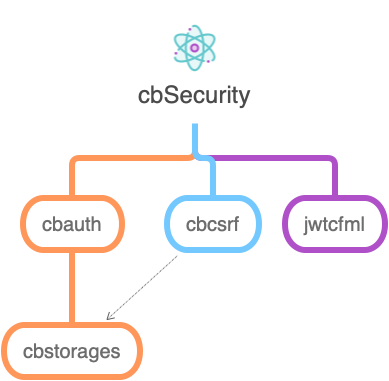
We have upgraded the security engine in FORGEBOX to now work with the ColdBox Security Module v2.x. This is now powering all the secure methods and soon a new way to authenticate via JWT instead of traditional API Keys. This also streamlines our internal security authorizations and gives us a clean roadmap for an API focused application and Vue.js admins.
Version TimeMachine!

We have introduced a new feature into the package management features of FORGEBOX where now every version will store it's own descriptions, boxJSON, changelogs and install instructions. You can also navigate through time via our new version navigator. Not only can you request and download the version you want from the UI, but also you can navigate to it's view page and visualize it just like the day you published it.

This is a great way to navigate versions via the UI and go back in time for that special version that made your ❤️ glad!
Version Editors

We have also completely revamped the package creation and editing process from the UI. CommandBox CLI is the easiest and fastest way to publish your packages to FORGEBOX, but we also wanted to provide a UI that would be useful as well. With the new UI you will find a more streamlined approach to editing your versions, managing them and even have built a box.json editor that has syntaxh highlighting and can spot issues in your package. Here is a collection of screenshots:


Release Notes
New Features
- [FORGEBOX-323] - Package version time machine core
- [FORGEBOX-435] - Update CbSecurity in Forgebox
- [FORGEBOX-543] - We need a subscription audit log component
- [FORGEBOX-559] - Upgrade to ColdBox 6
- [FORGEBOX-569] - Automatic migrations
- [FORGEBOX-570] - Package version time machine UI
Improvements
- [FORGEBOX-376] - Refactor request httpcontent code as the lucee bug has been fixed
- [FORGEBOX-393] - Present all public dates/times in the browser's timezone using JS
- [FORGEBOX-433] - Add more ways to install lucee extensions
- [FORGEBOX-550] - Consolidate all http requests to use Axios
- [FORGEBOX-566] - Upgrade Stripe API version to the latest
- [FORGEBOX-578] - Add CFcasts link to the main navigation bar under support menu
Bugs
- [FORGEBOX-276] - when you unpublish a package it leaves collaborations floating as orphaned recordsstorage/:slug/:version
- [FORGEBOX-557] - package type pages have generic titles
- [FORGEBOX-567] - Download Link in the version tab doesn't work



Add Your Comment