
If you've been watching the AI-assisted development wave from the sidelines, wondering when it would actually matter for your ColdBox HMVC stack; the wait is over. The latest ColdBox CLI release ships a brand-new ai namespace that transforms how you and your team interact with coding agents like Claude, GitHub Copilot, Cursor, Codex, OpenCode, Gemini and many more.
This isn't a chatbot integration or a prompt template sitting in a README. This is a full framework-aware AI system built directly into your development workflow.
What Is Agentic ColdBox?
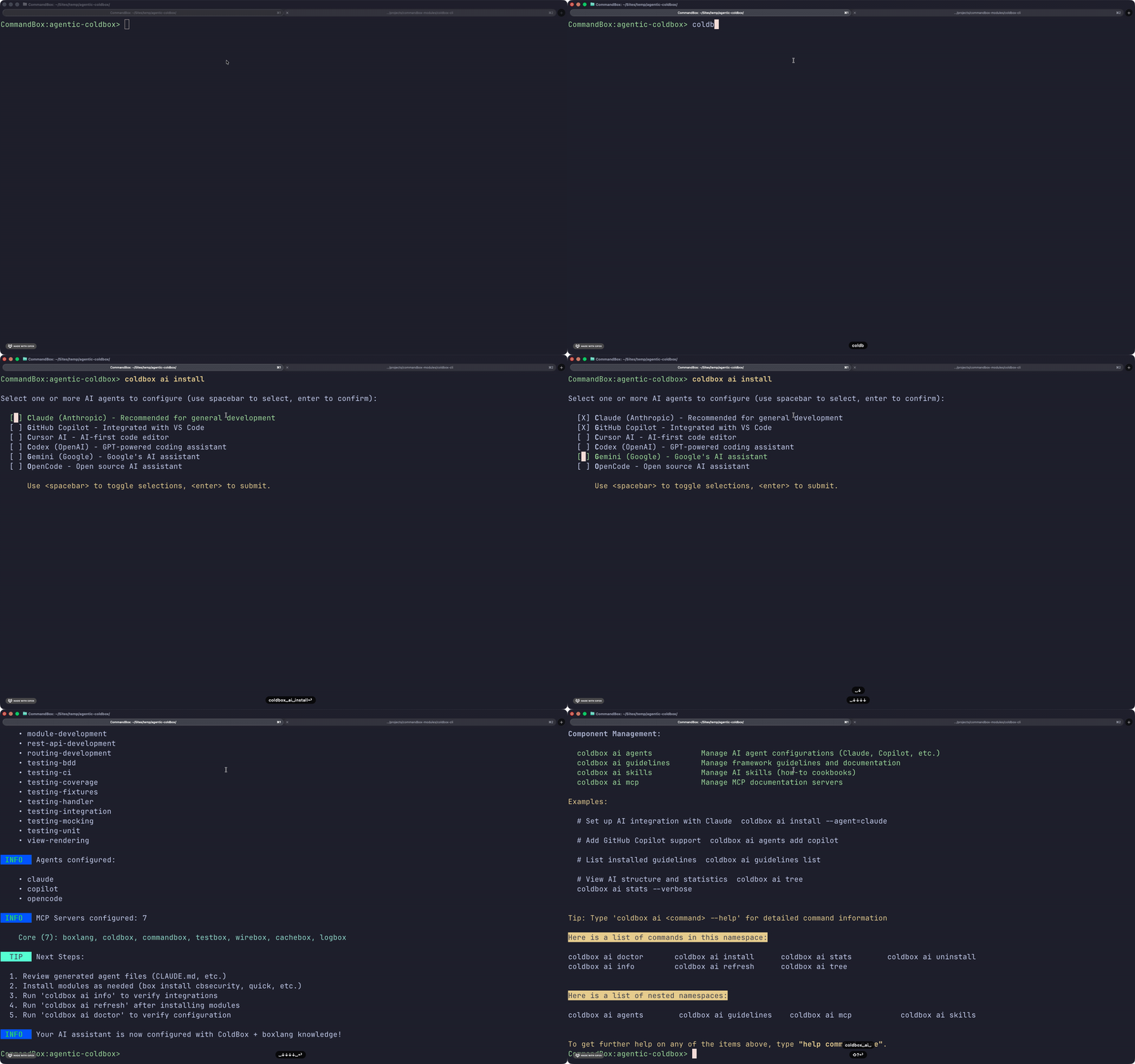
Agentic ColdBox is a comprehensive AI integration layer built into the coldbox-cli. It gives any supported coding agent: Claude, Copilot, Cursor, Codex, Gemini, OpenCode => deep, structured knowledge of your ColdBox application: its conventions, its modules, its architecture, and your project-specific patterns.
It does this through four coordinated components:
- Guidelines — Living documentation that teaches agents how ColdBox works
- Skills — On-demand coding cookbooks for specific tasks (building REST APIs, writing tests, creating handlers, etc.)
- Agents — Auto-generated configuration files for each supported AI assistant
- MCP Servers — The largest collection of Model Context Protocol servers bundled with any framework tooling — 30+ and counting
The result: agents that produce idiomatic ColdBox code, respect your conventions, and know your modules without needing you to explain everything in every prompt.
You can learn much more at the docs here: https://coldbox.ortusbooks.com/digging-deeper/ai/agentic-coldbox
Why This Matters for ColdBox Developers
AI coding assistants are only as good as the context they have. Without framework-specific knowledge, they generate generic code that misses ColdBox conventions, gets WireBox injection syntax wrong, invents nonexistent methods, or ignores your module ecosystem entirely.
Agentic ColdBox solves this at the source. Before you type a single prompt, your agent already knows:
- ColdBox MVC structure and routing conventions
- WireBox dependency injection patterns
- The BoxLang and CFML syntax distinctions
- The modules installed in your project (qb, cbsecurity, cborm, Quick, and 25+ more)
- Your team's custom guidelines and project-specific conventions
This is what "framework-aware AI" actually means in practice.
The Smart Context Architecture
One of the most thoughtful aspects of Agentic ColdBox is how it manages AI context. Loading everything upfront would bloat your context window and degrade agent performance. Instead, it uses a subagent pattern:
Core guidelines (ColdBox framework + language) are embedded directly in agent files, always present, zero friction.
Module guidelines and skills are inventoried with descriptions and loaded on-demand. When you ask an agent to "build a secure REST endpoint," it knows it can pull the cbsecurity guideline and the building-rest-apis skill and requests them only when needed.
46+ Guidelines. 71+ Skills. 30+ MCP Servers.
The scope of what ships out of the box is significant:
Guidelines cover the full ColdBox ecosystem: framework architecture, routing, WireBox, LogBox, CacheBox, TestBox, and 40+ module-specific docs including cbsecurity, qb, Quick ORM, cborm, cbvalidation, cbswagger, hyper, and more. They're automatically discovered when you install modules; no manual wiring required.
Skills are task-specific cookbooks covering everything from scaffolding handlers and models to writing BDD specs, implementing JWT authentication, building REST APIs, managing database migrations, configuring caching strategies, and deploying applications.
MCP Servers spans the entire Ortus Books infrastructure and easily extensible.
Works With Your Whole Team
One of the standout design decisions: your team doesn't have to agree on a single AI tool. Agentic ColdBox generates configuration files for all supported agents simultaneously:
CLAUDE.mdfor Claude Desktop and Claude Code.github/copilot-instructions.mdfor GitHub Copilot.cursorrulesfor Cursor IDEAGENTS.mdfor Codex and OpenCodeGEMINI.mdfor Gemini CLI
Every developer on your team uses their preferred tool. Every agent operates from the same guidelines, skills, and conventions. Consistent output, flexible tooling.
Module Authors: You're Invited Too
If you publish CommandBox, or ColdBox or BoxLang modules, Agentic ColdBox has a first-class contribution path. Add an .ai/ directory to your module with a guidelines/core.md and skills under skills/your-task/SKILL.md, and ColdBox automatically discovers and integrates them when developers run coldbox ai refresh after installing your package.
Your module ships with its own AI knowledge built in.
Build Your Own Guidelines and Skills
This is where Agentic ColdBox goes beyond generic AI tooling: your team can extend the system with knowledge that's specific to your codebase.
Custom Guidelines let you codify your domain knowledge — your authentication architecture, your payment processing conventions, your deployment procedures, your internal service patterns. Drop a markdown file into .ai/guidelines/custom/ and every agent on your team immediately understands how your application is structured.
Custom Skills are task-specific cookbooks for your workflows — how to deploy to your Kubernetes cluster, how to generate your internal report format, how to work with your company's data migration patterns. Add a SKILL.md to .ai/skills/custom/your-skill-name/ and agents can pull it on demand when the task calls for it.
Both are version-controlled alongside your code, so the whole team benefits automatically. New developer joins the project, runs coldbox ai install, and their agent is immediately context-aware of your application's full landscape — not just the framework, but your specific conventions.
You can also override any core or module guideline to adapt it to your team's standards:
# Override a built-in guideline with your version
coldbox ai guidelines install coldbox --override

# Override a built-in skill with your version
coldbox ai skills install creating-handlers --override
This gives you the full baseline of ColdBox knowledge, customized exactly where your conventions diverge.
A Full CLI for Every Aspect of the Integration
The coldbox ai namespace is a complete management surface — not just a setup wizard. Here's a tour of what's available:
Setup and Information
coldbox ai install           # Interactive installation wizard
coldbox ai info              # Show current configuration
coldbox ai tree              # Visual hierarchy of all components
coldbox ai tree --verbose    # Include full file paths
coldbox ai refresh           # Sync with installed modules
Managing Guidelines
coldbox ai guidelines list                    # List installed guidelines
coldbox ai guidelines list --verbose          # Include descriptions
coldbox ai guidelines install coldbox qb      # Install specific guidelines
coldbox ai guidelines install coldbox --override  # Install as a customizable override
coldbox ai guidelines uninstall qb            # Remove a guideline
coldbox ai guidelines refresh                 # Pull updates from modules
Managing Skills
coldbox ai skills list                        # List installed skills
coldbox ai skills list --verbose              # Include descriptions
coldbox ai skills install creating-handlers   # Install a specific skill
coldbox ai skills install creating-handlers --override  # Install as override
coldbox ai skills uninstall creating-handlers # Remove a skill
coldbox ai skills refresh                     # Pull updates from modules
Managing Agents
coldbox ai agents list                        # See all supported agents
coldbox ai agents add claude copilot cursor   # Add agent configurations
coldbox ai agents remove cursor               # Remove an agent
coldbox ai agents refresh                     # Regenerate all config files
Managing MCP Servers
coldbox ai mcp list                           # List configured servers
coldbox ai mcp info                           # Show configuration details
coldbox ai mcp add github postgres            # Add servers
coldbox ai mcp remove postgres                # Remove a server
coldbox ai mcp config                         # Generate .mcp.json for agents
coldbox ai mcp config --agent=claude          # Agent-specific MCP config
Diagnostics and Analytics
coldbox ai doctor                # Validate full integration health
coldbox ai doctor --fix          # Auto-fix common issues
coldbox ai stats                 # Context usage overview
coldbox ai stats --verbose       # Breakdown by model (Claude, GPT-4, Gemini, etc.)
coldbox ai stats --json          # Machine-readable output for automation
The doctor command is particularly useful on a team — it validates installation completeness, file structure integrity, configuration validity, module sync status, agent configuration correctness, and context size optimization, and flags anything that needs attention with suggested fixes.
The stats command shows exactly how much of your AI model's context window the integration is consuming across Claude, GPT-4, GPT-3.5-Turbo, and Gemini — so you always know your headroom.
Getting Started in Two Commands
# Make sure you're on the latest coldbox-cli
box install coldbox-cli

# Run the interactive setup wizard
coldbox ai install
The wizard walks you through agent selection, guideline configuration, skill selection, and MCP server setup. After that, a .ai/ directory lives in your project — version-controllable, team-shareable, and automatically kept in sync with your installed modules.
Keep everything current after adding new modules:
coldbox ai refresh
This Is Only the Beginning
The coldbox ai install command is a one-time setup. The value compounds over time as your team adds custom guidelines for your domain, custom skills for your workflows, and new modules that ship their own AI knowledge.
ColdBox has always been the most actively and comprehensively maintained MVC framework for CFML and now for BoxLang. Agentic ColdBox is the next expression of that commitment, bringing the AI-assisted development experience that other ecosystems are still catching up to, natively, to the framework you already know.
Update your coldbox-cli and run coldbox ai install today.
Full documentation: https://coldbox.ortusbooks.com/digging-deeper/ai/agentic-coldbox




Add Your Comment