
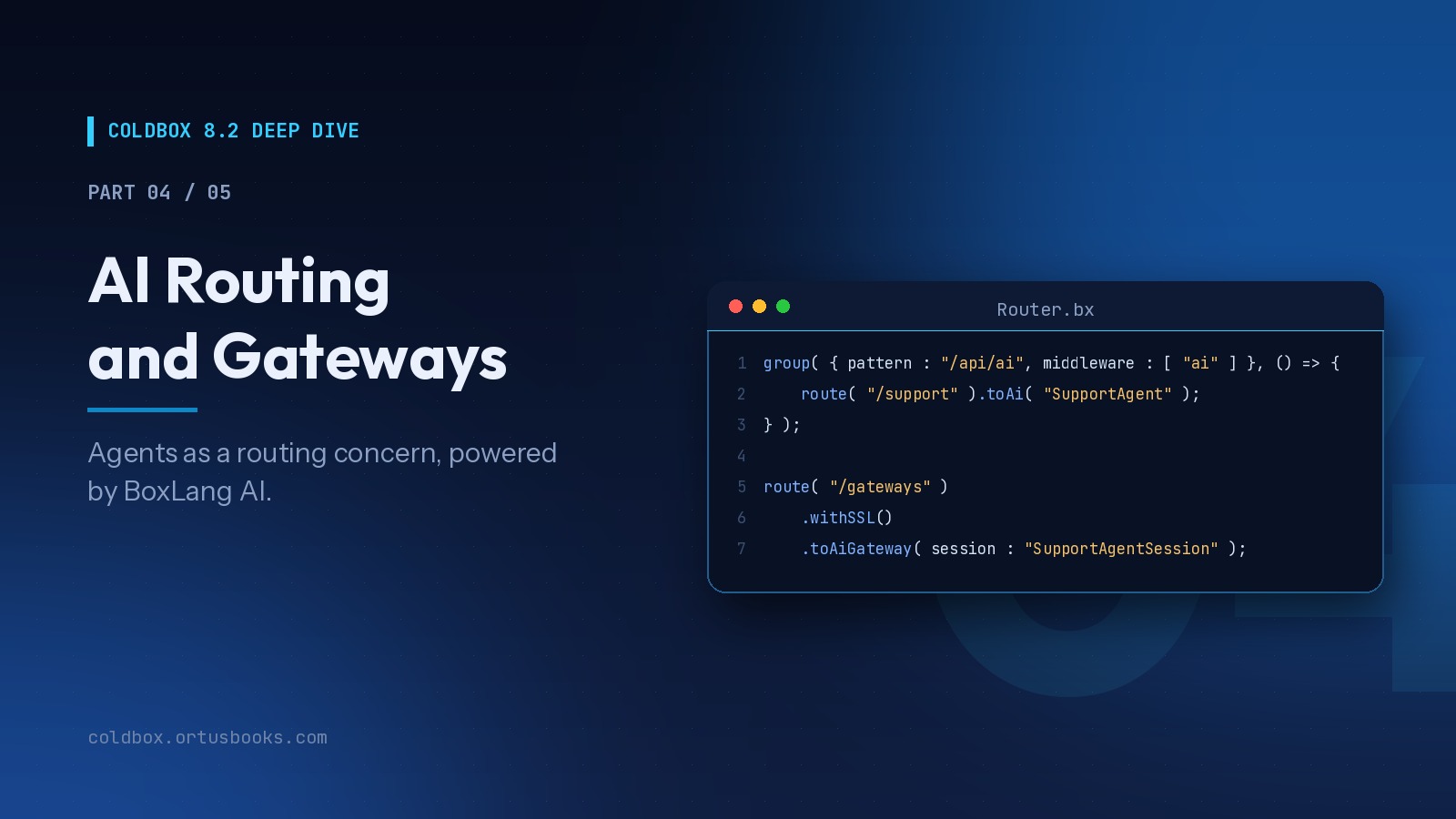
The series:
- Route-Scoped Middleware
- HTTP Caching Done Right
- Server-Sent Events You Can Test
- AI Routing and Gateways (you are here)
- Capstone: Building a Live Support Desk
We've been building AI into the core of ColdBox since 8.0, because the applications teams are asked to build have changed. They talk to models, stream answers, expose tools to other AI systems, and increasingly host agents that act on behalf of users. None of that should require bespoke plumbing in every project.
ColdBox treats AI as a routing concern, powered by BoxLang AI (bx-ai). Today we cover all three directions AI traffic flows, with a focus on what's new in 8.2.0: conversational context and AI Gateways.
Everything in this post requires BoxLang and the bx-ai module.
Three Directions, Three Terminators
| Terminator | Traffic direction | You control the client? |
|---|---|---|
toAi() | Your frontend/API client → your agent | Yes |
toMCP() | AI clients → your tools and data | No, they speak MCP |
toAiGateway() | A platform (Slack, webhooks) → your agent | No, they speak their protocol |
Each is a single router line that expands into several concrete routes, the same way resources() does.
Step 1: An Agent in WireBox
First, build an agent with bx-ai and make it injectable. A factory keeps construction in one place:
// models/ai/AgentFactory.bx
class singleton {

    property name="ticketService" inject;

    function buildSupportAgent(){
        var lookupTicket = aiTool(
            "lookup_ticket",
            "Look up a support ticket by its number",
            ( ticketNumber ) => ticketService.findByNumber( ticketNumber ).getMemento()
        ).describeTicketNumber( "The ticket number, e.g. T-1042" );

        return aiAgent(
            name         : "SupportAgent",
            description  : "Answers questions about customer support tickets",
            instructions : "You help support staff. Be concise. Always cite the ticket number.",
            tools        : [ lookupTicket ],
            memory       : aiMemory( "cache" )
        );
    }

}
// config/WireBox.bx
function configure(){
    map( "SupportAgent" )
        .toFactoryMethod( factory : "ai.AgentFactory", method : "buildSupportAgent" )
        .asSingleton();
}
The agent is now a WireBox singleton, built once, injectable anywhere, and ready to route.
Step 2: toAi() Serves It Over HTTP
// config/Router.bx
route( "/api/ai/support" ).toAi( "SupportAgent" );
That one line registers four endpoints:
| Verb | Path | Calls on the runnable |
|---|---|---|
POST | /api/ai/support/invoke | run( input, params, options ) |
POST | /api/ai/support/stream | stream( onChunk, input, params, options ) |
POST | /api/ai/support/batch | run() for each item in inputs[] |
GET | /api/ai/support/info | name, description, endpoint list |
The runnable can be a WireBox ID (resolved lazily per request, so routing never forces construction) or a live object. Anything that implements bx-ai's IAiRunnable works, so you're not limited to agents. A model, a pipeline, or your own class can sit behind the same endpoints.
Protect it with group middleware
AI endpoints cost real money per call. Put them behind the middleware from Part 1. Because toAi() expands into several sub-routes, attach the middleware at the group level so every sub-route inherits it:
// config/Router.bx
middlewareGroup( "ai", [ "RequireLogin", "AiRateLimiter" ] );

group( { pattern : "/api/ai", middleware : [ "ai" ] }, () => {
    route( "/support" ).withSSL().toAi( "SupportAgent" );
} );
Step 3: Conversational Context (New in 8.2.0)
A chat isn't a single request. It's a thread of them, from a user, possibly inside a larger conversation. Every team building AI features ends up writing the same bookkeeping. ColdBox 8.2.0 does it for you.
The invoke, stream, and batch endpoints now resolve three identifiers from the request body and merge them into options before calling your runnable:
| Field | Behavior |
|---|---|
userId | From the body, or else the framework's session/request tracking identifier |
conversationId | Passed through only if supplied. No default is invented |
threadId | From the body, or a new one is generated. Always returned |
POST /api/ai/support/invoke
{ "input": "What's the status of T-1042?", "threadId": "t-7f3a" }

→ runnable.run( "What's the status...", {}, { userId: "<session id>", threadId: "t-7f3a" } )

← { "output": "T-1042 is waiting on the customer...", "success": true, "threadId": "t-7f3a" }
← X-Thread-Id: t-7f3a
Why this matters in practice: bx-ai agents already accept userId and conversationId in options to scope their memory. With toAi() resolving them automatically, every user gets isolated conversation memory with zero code in your application.
If you write your own runnable, the context is right there:
// models/ai/TicketSummarizer.bx
class implements="bxModules.bxai.models.runnables.IAiRunnable" {

    property name="conversationStore" inject;

    function run( input, params = {}, options = {} ){
        var history = conversationStore.load( options.userId, options.threadId );
        var answer  = aiChat( history.append( { role : "user", content : input } ) );
        conversationStore.append( options.userId, options.threadId, input, answer );
        return answer;
    }

    // stream(), getName(), getDescription() ...
}
Step 4: A Streaming Chat Client
The /stream endpoint pipes chunks as Server-Sent Events, built on the exact SSE layer from Part 3. It opens with a thread frame, then chunk frames, then done:
event: thread
data: {"threadId":"t-7f3a"}

event: chunk
data: {"token":"T-1042 is"}

event: chunk
data: {"token":" waiting on"}

event: done
data: [DONE]
Because /stream is a POST, the browser's EventSource (which only does GET) isn't the right client here. fetch with a stream reader is, and it's short:
// assets/js/supportChat.js
async function ask( input ) {
    const threadId = localStorage.getItem( "supportThread" ) || undefined;

    const response = await fetch( "/api/ai/support/stream", {
        method  : "POST",
        headers : { "Content-Type": "application/json", "Accept": "text/event-stream" },
        body    : JSON.stringify( { input, threadId } )
    } );

    const reader  = response.body.getReader();
    const decoder = new TextDecoder();
    let buffer    = "";

    while ( true ) {
        const { value, done } = await reader.read();
        if ( done ) break;
        buffer += decoder.decode( value, { stream: true } );

        const frames = buffer.split( "\n\n" );
        buffer = frames.pop();

        for ( const frame of frames ) {
            const event = frame.match( /^event: (.*)$/m )?.[ 1 ];
            const data  = frame.match( /^data: (.*)$/m )?.[ 1 ];

            if ( event === "thread" ) localStorage.setItem( "supportThread", JSON.parse( data ).threadId );
            if ( event === "chunk" )  appendToken( JSON.parse( data ).token );
        }
    }
}
The leading thread frame is the detail that makes this clean: the client learns a server-generated thread ID from inside the stream itself, persists it, and the next question continues the same conversation.
Step 5: toMCP() Exposes Your Tools
The reverse direction: let other AI systems (IDEs, desktop assistants, other agents) call your application's tools over the Model Context Protocol:
// One mount serving every registered MCP server by name
route( "/mcp/:mcpServer" ).withSSL().toMCP();
/mcp/tickets and /mcp/inventory each dispatch to the matching MCP server registered with bx-ai. Your business logic becomes a tool any MCP-capable client can use.
Step 6: toAiGateway() Puts Your Agent Where People Work (New in 8.2.0)
toAi() assumes you control the client. But a lot of agent traffic comes from platforms you don't control: Slack, Telegram, WhatsApp, or a partner's signed webhook. Each has its own payload format, verification handshake, signature scheme, and timeout.
A bx-ai gateway is a bidirectional adapter that handles all of that. toAiGateway() puts it on a route.
Register gateways and a session
Gateways are registered with bx-ai at startup, for example in a module's onLoad() or an afterAspectsLoad() interceptor:
// interceptors/AiBootstrap.bx
class {

    function afterAspectsLoad( event, data, buffer, rc, prc ){
        aiGatewayRegistry().register(
            aiGateway( "http", { secret : getSystemSetting( "GATEWAY_SECRET" ) } )
        );
        // Platform gateways (Slack, Telegram, ...) register the same way.
        // See the BoxLang AI docs for each platform's settings.
    }

}
A session connects gateways to an agent. Build it with a factory and map it as a singleton:
// models/ai/GatewaySessionFactory.bx
class singleton {

    property name="supportAgent" inject="SupportAgent";

    function build(){
        return aiGatewaySession(
            agent    : variables.supportAgent,
            gateways : [ aiGatewayRegistry().get( "http" ) ],
            policy   : "queue"
        ).start();
    }

}
// config/WireBox.bx
map( "SupportAgentSession" )
    .toFactoryMethod( factory : "ai.GatewaySessionFactory", method : "build" )
    .asSingleton();
Route it
// config/Router.bx
route( "/gateways" ).withSSL().toAiGateway( session : "SupportAgentSession" );
| Verb | Pattern | Purpose |
|---|---|---|
POST | /gateways/:gateway/events | Inbound platform event |
GET | /gateways/:gateway/events | Platform URL verification handshake |
GET | /gateways/interactions/:requestID | Poll a pending human approval |
POST | /gateways/interactions/:requestID/decisions | Submit a human decision |
GET | /gateways/info | Registered gateways and capabilities |
Or pin a mount to one platform, so the URL can never be redirected to a different gateway:
route( "/webhooks/partner" ).withSSL().toAiGateway( "http", "SupportAgentSession" );
What happens on an inbound event
- The gateway's own
verifyInbound()checks the signature before anything is parsed. Forged requests get a401and never reach your code. (bx-ai'shttpgateway uses HMAC-SHA256 with nonce dedup and a timestamp tolerance.) - The payload is normalized into messages.
- Each message is dispatched to the agent as a turn.
- The platform gets a
202immediately, with the thread each message landed on:
{ "accepted" : 1, "messages" : [ { "id" : "...", "threadId" : "slack:C1234" } ] }
That immediate ack is the design decision that matters most. Platform webhooks time out in seconds. Agent turns take as long as they take. Blocking one on the other is how chatbots randomly "go silent" in production. ColdBox never waits.
Leave out the session and the gateway only verifies and parses, returning 200 with normalized messages for your own code to handle.
Human-in-the-loop
Some agent actions shouldn't happen without a person saying yes: refunds, account changes, emails to customers. In bx-ai, you mark tools as requiring approval, and the agent suspends instead of acting:
// models/ai/AgentFactory.bx
import bxModules.bxai.models.middleware.core.HumanInTheLoopMiddleware;

// ... inside buildSupportAgent(): a tool that needs a human
var issueRefund = aiTool(
    "issue_refund",
    "Refund a customer order",
    ( orderId, amount ) => billingService.refund( orderId, amount )
);

return aiAgent(
    name       : "SupportAgent",
    tools      : [ lookupTicket, issueRefund ],
    middleware : [
        new HumanInTheLoopMiddleware(
            toolsRequiringApproval : [ "issue_refund" ],
            gateway                : aiGatewayRegistry().get( "http" )
        )
    ],
    checkpointer : aiMemory( "cache" ), // persists the suspended turn until a human decides
    memory       : aiMemory( "cache" )
);
Two details matter here. First, pass the gateway explicitly: without one, the middleware defaults to mode : "cli" and would prompt on the server console, which is never what a web app wants. Second, add a checkpointer so the suspended turn survives until someone decides. Since the agent is a lazily built WireBox singleton, it's constructed on first use, after the gateway was registered at startup.
The gateway's interaction endpoints are how that approval happens over HTTP:
GET  /gateways/interactions/{requestID}
←    the pending question and its allowed decisions

POST /gateways/interactions/{requestID}/decisions
     { "decision": "approve", "reason": "Verified with customer" }
Decision requests must be signed the same way inbound events are, so approvals can't be forged either. Resolving an already-resolved interaction returns 409, and an expired one returns 410.
Security checklist
- Always
.withSSL()these routes. They're internet-facing by definition. - Keep secrets in environment variables, never in the router.
- Use
.withCondition()for kill switches:.withCondition( ( route, params, event ) => !maintenanceMode ). - For any extra checks (IP allow-lists, tenant resolution), wrap the mount in a
group()with middleware, as withtoAi().
Testing AI Routes
You don't need a live model to verify your AI surface. Test the contract and the security:
// tests/specs/integration/AiRoutesSpec.bx
class extends="coldbox.system.testing.BaseTestCase" appMapping="/" {

    function run(){
        describe( "AI routes", () => {

            beforeEach( () => setup() );

            it( "describes the support agent", () => {
                var info = this.get( "/api/ai/support/info" ).getValue( "cbox_rendered_content" );
                expect( deserializeJSON( info ).name ).toBe( "SupportAgent" );
            } );

            it( "rejects unsigned gateway events", () => {
                var event = this.post(
                    route : "/gateways/http/events",
                    body  : serializeJSON( { "text" : "hi" } )
                );
                expect( event.getStatusCode() ).toBe( 401 );
            } );

        } );
    }

}
For agent behavior itself, map a stub runnable in WireBox during tests (anything with run() and stream()), so your routing, middleware, and threading logic are tested without spending tokens.
Where This Is Heading: bxAgents
Everything in this post is the foundation. Look back at what we wired by hand: an agent factory, tool definitions, WireBox mappings, a gateway session, router entries. It's clean code, but it's the same plumbing every agent needs. That's a sign it should be a convention.
That's what bxAgents is: our new conventions-based framework for building AI agents, powered by BoxLang AI and built on ColdBox. You describe an agent with a handful of files and folders, and only the ones you actually need:
my-agent/
├── Agent.bx          ← the agent
├── instructions.md   ← its always-on instructions
├── tools/            ← any class with an @AITool function becomes a tool
├── skills/           ← model-selected guidance (SKILL.md)
├── subagents/        ← nested agents, attached automatically
├── gateways/         ← one entry per exposure or chat platform
├── schedules/        ← a real ColdBox scheduler
├── mcp/              ← re-expose your tools as an MCP server
└── interceptors/     ← ColdBox interceptors
Then bxAgents build assembles a real, plain ColdBox application from it. That's the part that connects to this post: the generated app uses the exact features you just learned, natively. Exposing an agent over HTTP mounts it with toAi(), with the invoke, stream, and batch routes and conversational context included. An http gateway is mounted with route( "/gateways" ).toAiGateway(), verification handshake and human-in-the-loop endpoints included. Nothing is hand-wired, and nothing new is invented underneath. It's ColdBox 8.2 all the way down.
install-bx-module bx-ai bx-agents

bxAgents new my-agent --model=openai/gpt-5
cd my-agent

bxAgents build    # assembles a real ColdBox app under .build/app
bxAgents chat     # or: bxAgents serve --port=8080
A few things we think teams will appreciate:
- Build-time assembly. Discovery, validation, and code generation run once at build, not on every boot. Duplicate names, subagent cycles, unknown providers, and missing environment variables are caught before you deploy.
- Gateways for where people already work. Telegram, Slack, Discord, Signal, Email, WhatsApp, Microsoft Teams, Twilio SMS, and GitHub, each with human-in-the-loop approval support. Credentials are always referenced by environment variable, never embedded in config.
- More ways to expose an agent. An HTTP API, an MCP server, or a complete generated web chat UI with streaming and approvals, without a frontend build step.
- Deterministic packaging.
bxAgents packageproduces a portable.bxaarchive you can verify and deploy anywhere BoxLang runs. - Testable agents. A TestBox base spec with mocked model responses and agent-aware matchers, including tool-call assertions.
bxAgents is in early release, and we'll have much more to share soon. In the meantime, the docs, tutorials, and example projects are at bxagents.ai.
Why This Matters
For developers, AI features become as conventional as REST endpoints: a router line, a WireBox mapping, and your logic.
For technical leaders, the value is governance. Every AI surface in the application, whether it's a chat API, an MCP server, or a Slack-facing agent, flows through the same router, the same middleware, the same SSL and security policies, and the same test suite. Human approval for sensitive actions is a platform capability, not something each team has to reinvent. That's the difference between experimenting with AI and running it in production.
Up Next
In Part 5: Capstone, we put it all together and build a live support desk: middleware-secured routes, cached ticket pages, a live SSE feed, an AI assistant with conversational memory, a gateway for inbound messages with human-approved refunds, and a test suite covering all of it.
box update coldbox
box install bx-ai


Add Your Comment