Blog

Luis Majano

July 08, 2016

Spread the word


Share your thoughts


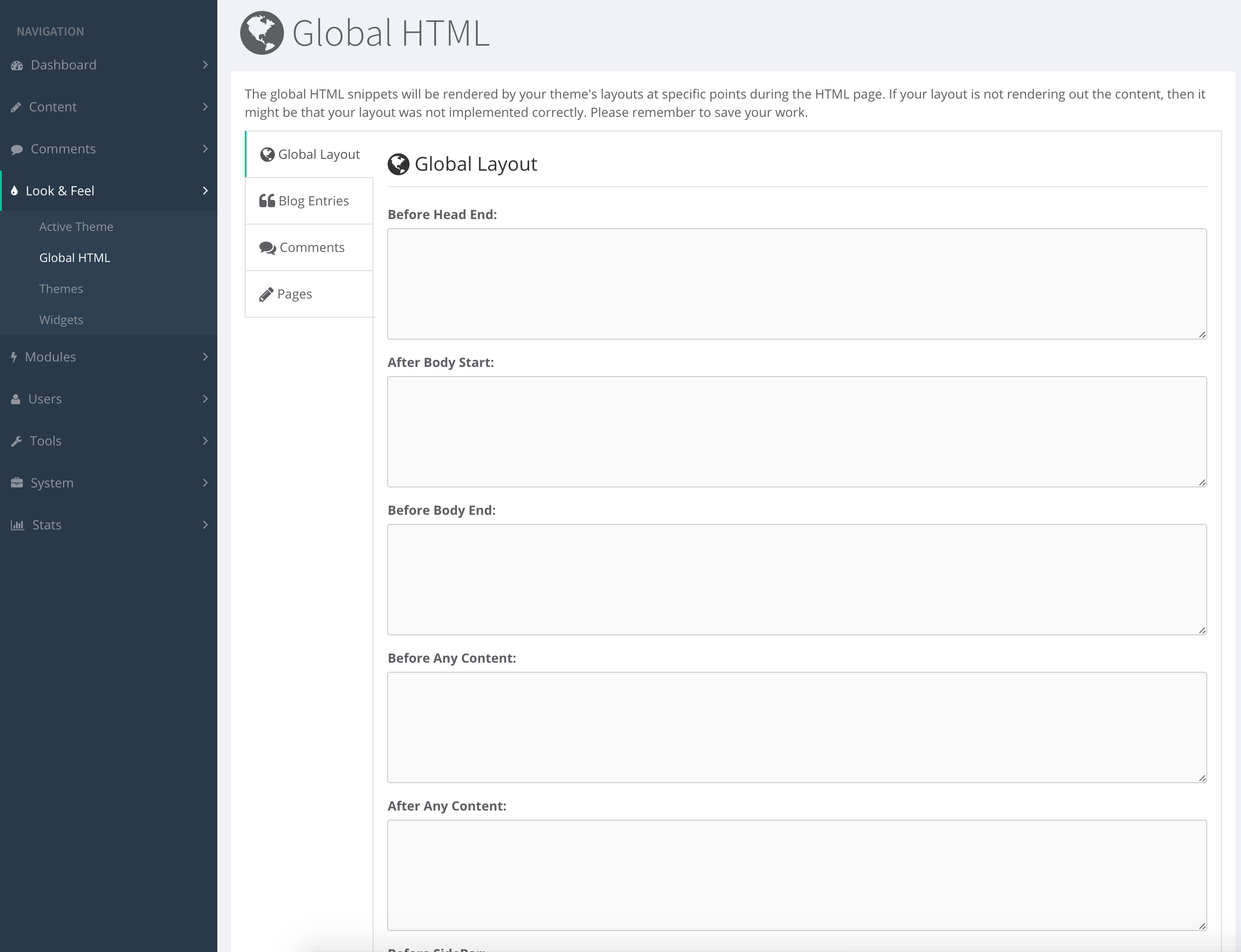
ContentBox has what we call, a Global HTML manager. This manager allows you to seamlessly drop in JavaScript/CSS/HTML to specific theme and UI presentation life-cycle events.

Please note that the active theme must implement the life-cycle events in order for the Global HTML output to happen.

Purpose

The purpose of the Global HTML manager is to allow the integration of third-party scripts, CSS or HTML integrations easily without altering code or programming it in the theme. This allows for cross-theme output in a manageable manager.

Event Sections

The following are the sections where you can intercept and put data for output:

  • Global Layout
  • Blog Entries
  • Comments
  • Pages

You can add custom markup for any of the interception points show in this section, from after any content, before any comment, after any blog entry, etc.

Theme implementation

Implementing these events are super easy. All you have to do is announce the event using the ContentBox helper class's method: event() anywhere you want the content to output. Here is an example:


    #cb.event( "cbui_beforeHeadEnd" )#

The many events you can announce are:

"cbui_beforeHeadEnd",
"cbui_afterBodyStart",
"cbui_beforeBodyEnd",
"cbui_footer",
"cbui_beforeContent",
"cbui_afterContent",
"cbui_beforeSideBar",
"cbui_afterSideBar",
"cbui_preEntryDisplay",
"cbui_postEntryDisplay",
"cbui_preIndexDisplay",
"cbui_postIndexDisplay",
"cbui_preCommentForm",
"cbui_postCommentForm",
"cbui_prePageDisplay",
"cbui_postPageDisplay",
"cbui_preArchivesDisplay",
"cbui_postArchivesDisplay"

Summary

Hopefully now you can see how easy it is to output custom HTML, JavaScript, CSS or whatever you like in specific execution points of your theme. This allows you to easily integrate with things like social sharing, Google Analytics and much more.
Add Your Comment

(1)

Aug 10, 2016 09:26:32 UTC

by Dan OKeefe

What would be the approach to implement a theme based on bootstrap such as https://wrapbootstrap.com/theme/ace-responsive-admin-template-WB0B30DGR? Would I use globalHTML like I would a layout? Or are layouts still respected? I am wondering if I have to pick a theme at all and still use contentbox to manage the site (module).

Recent Entries

BoxLang AI v2: Enterprise AI Development Without the Complexity

BoxLang AI v2: Enterprise AI Development Without the Complexity

One Year. 100+ Features. Unlimited Possibilities.

Just one year ago, in March 2024, we launched BoxLang AI 1.0. Today, we're thrilled to announce BoxLang AI v2—a massive leap forward that positions BoxLang as the most powerful and versatile AI framework on the JVM.

Luis Majano
Luis Majano
January 19, 2026
CommandBox: A Smarter Foundation for BoxLang and CFML Workflows

CommandBox: A Smarter Foundation for BoxLang and CFML Workflows

In day-to-day development, some tools simply do their job… and others quietly change the way you work. CommandBox falls into the second category.

It doesn’t replace your editor, framework, or existing applications. Instead, it becomes the common ground where CFML and BoxLang development meet ,giving teams a consistent, reliable way to build, run, and evolve their projects.

Victor Campos
Victor Campos
January 16, 2026
BoxLang v1.9.0 : Production-Ready Stability, Enhanced Lifecycle Management, and Rock-Solid Reliability

BoxLang v1.9.0 : Production-Ready Stability, Enhanced Lifecycle Management, and Rock-Solid Reliability

Happy New Year! The BoxLang team is excited to announce BoxLang 1.9.0, a significant stability and compatibility release focused on production-readiness thanks to our client migrations and new application deployments. This release also introduces array-based form field parsing conventions, enhanced datasource lifecycle management, improved context handling, and resolves over 50 critical bugs to ensure enterprise-grade reliability for mission-critical applications.

Luis Majano
Luis Majano
January 09, 2026