Blog

CommandBox REPL

Curt Gratz February 11, 2015

Spread the word

Curt Gratz

February 11, 2015

Spread the word


Share your thoughts

Ever want to try something quick in CFML? Show something off and get the feedback instantly? 

One of the things CommandBox can do for you is provide a REPL (Read-Evaluate-Print-Loop) console for immediate ColdFusion (CFML) interaction so you can do just that.

After CommandBox is installed, just run 

box repl

This will open a interactive console that will run CFML. 

Here is a screen shot of some commands and their output using the CommandBox REPL
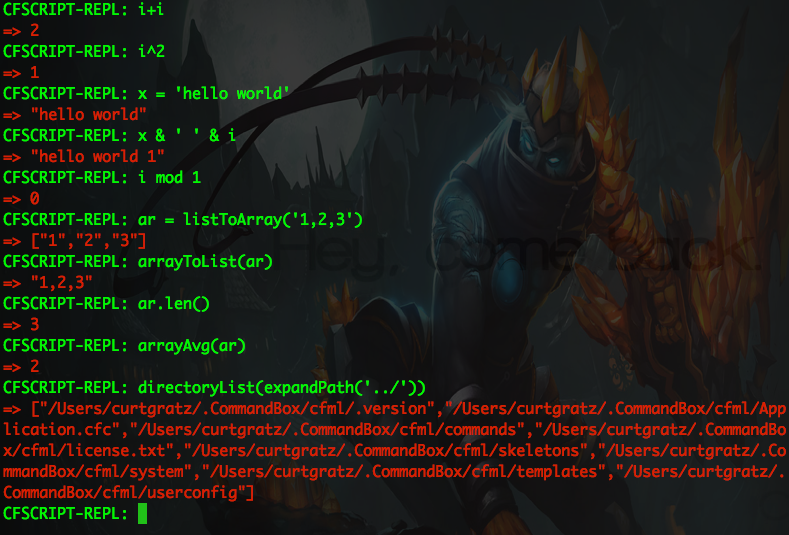
As you can see, you can run any CFML function and it will return its output, do math, or whatever you need a REPL for.

Add Your Comment

Recent Entries

BoxLang v1.13.0: Compatibility, Concurrency, and Formatter Maturity

BoxLang v1.13.0: Compatibility, Concurrency, and Formatter Maturity

BoxLang 1.13.0 is here, and it marks an important step forward for the platform. This release includes 48 tickets—every one of them completed—reflecting a focused effort on CFML compatibility, a more robust concurrency engine, a production-hardened miniserver, and meaningful tooling improvements.

Luis Majano
Luis Majano
April 30, 2026
🚀 ColdBox CLI 8.11: The Era of AI Skills Comes to Every ColdBox & BoxLang App

🚀 ColdBox CLI 8.11: The Era of AI Skills Comes to Every ColdBox & BoxLang App

ColdBox CLI 8.11 is here, and it's one of the most significant releases we've shipped for AI-assisted development. This release wires the CLI directly into our brand new public skills directory at skills.boxlang.io, brings our AI tooling in line with industry-wide agent conventions, and introduces a wave of quality-of-life improvements that make AI integration feel less like setup and more like infrastructure.

Luis Majano
Luis Majano
April 30, 2026