

 We are pleased to announce a minor maintenance release of CommandBox. Version 4.4.0 is released just in time for CFCamp with a handful of fixes and a few nice features. I'm writing this up on the plane on my way to Germany for CFCamp so I'll be brief :)
Many of the cool new features came as pull requests for the community. Thanks a ton to everyone who contributed!
Download
We have updated all the usual download locations including HomeBrew and the main download links on our site. To upgrade, just grab the latest box binary and replace the old one.
https://ortussolutions.com/products/commandbox#download
Documentation
All the docs have been updated for the 4.4.0 version and can be accessed here:
https://commandbox.ortusbooks.com/
http://apidocs.ortussolutions.com/commandbox/4.4.0/index.html
New Features
Here's a few notable features coming to you in CommandBox 4.4.0.
Iterate over JSON with foreach command
The foreach command which was introduced recently and allows you to iterate over any list of input and run a command using each item in the list has been enhanced to also allow you to iterate from the CLI over any JSON string that you pipe in.
package show dependencies | foreach
https://commandbox.ortusbooks.com/usage/foreach-command#iterating-over-json
Directory Watchers have more data
Now when you create a directory watcher in a task runner or custom command, you can not only get notified when something in that directory changes, but you also now receive a list of files added, removed, and modified.
watch()
    .onChange( function( paths ) {
        print
            .line( '#paths.added.len()# paths were added!' )
            .line( '#paths.removed.len()# paths were removed!' )
            .line( '#paths.changed.len()# paths were changed!' )            ;
    } )
    .start();
New "coldbox watch-reinit" command
Thanks to Scott Steinbeck, we have a new command called coldbox watch-reinit. This will watch for changes to certain files in your project and will automatically issue a framework reinit when you edit things like configs or services.
package set reinitWatchPaths= "config/**.cfc,models/**.cfc,ModuleConfig.cfc"
coldbox watch-reinit
Color all the JSONs
Thanks to John Berquist, CommandBox now has sweet color coding any time it outputs JSON to the screen. Try it out by running something like "server show".
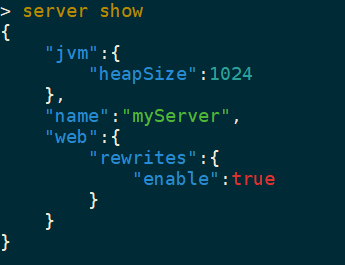
Users can also customize the colors they see for JSON with the following config settings:
- json.ansiColors.constant
- json.ansiColors.key
- json.ansiColors.number
- json.ansiColors.string
Setting values can be any color name from the system-colors command.
New Gist endpoint
Thanks to Jason Steinshouer we have a new Gist endpoint for installing code from a public Gist.
install gist:b6cfe92a08c742bab78dd15fc2c1b2bb
https://commandbox.ortusbooks.com/package-management/code-endpoints/gist
4.4.0 Release Notes
Bug
- [COMMANDBOX-876] - testbox watcher shows error when test fail
- [COMMANDBOX-881] - Tab complete doesn't work on param values with spaces
- [COMMANDBOX-882] - Long lines wrap in interactive jobs
- [COMMANDBOX-887] - Exact versions don't update from ForgeBox when manually changed.
- [COMMANDBOX-895] - Passing positional args to task errors with required param
New Feature
- [COMMANDBOX-877] - Allow watcher access to files that were added, removed, updated
- [COMMANDBOX-878] - coldbox watch-reinit command
- [COMMANDBOX-879] - Color code JSON on console output by default
Improvement
- [COMMANDBOX-698] - Refresh any salt values when deploying a new CF engine.
- [COMMANDBOX-732] - Add Gist endpoint
- [COMMANDBOX-880] - Change update behavior of GIT and URL endpoints to use semver in path if present
- [COMMANDBOX-883] - Enhance foreach command to accept JSON
- [COMMANDBOX-884] - ACF 11 should start without Secure Profile
- [COMMANDBOX-890] - Enhance "forgebox search" command to break up versions like "forgebox show"
- [COMMANDBOX-891] - Support versions like 0.5.2 in forgebox show/search output
- [COMMANDBOX-892] - Speed up embedded server start


Add Your Comment