
How CBWIRE Works: A Step-by-Step Look at Reactive UI Components
One of the most powerful aspects of CBWIRE is how it brings reactivity and interactivity to your BoxLang and CFML applications using a server-driven approach. To understand how it works under the hood, let’s walk through a common example: the Counter component from the CBWIRE Introduction.
This breakdown follows the flow of how CBWIRE processes user interaction, updates state, and keeps your UI in sync, all without needing to write a separate frontend application or use JavaScript.
Step-by-Step Overview
Let’s explore what happens when a user interacts with a CBWIRE-powered component.
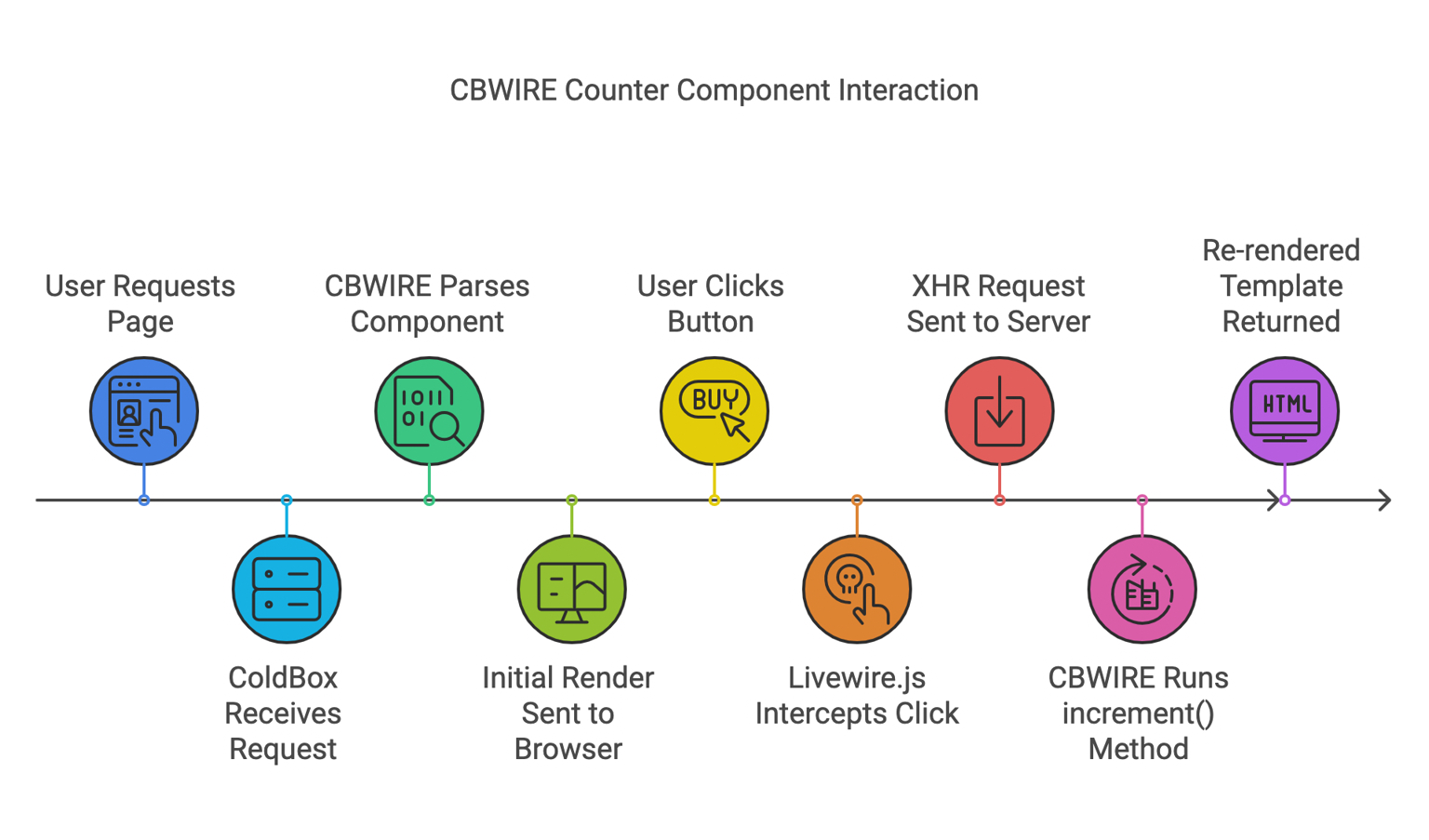
1. User Requests the Page
The user requests a page from the server that includes the Counter component.
2. ColdBox Handles the Request
ColdBox receives the HTTP request and begins processing it like any typical page load.
3. CBWIRE Parses and Renders the Component
CBWIRE identifies the Counter component on the page, parses it, and renders it using its default state (for example, count = 0).
4. The Rendered Component Is Sent to the Browser
The fully rendered HTML is returned to the browser. Up to this point, everything behaves just like a standard server-rendered application. Nothing reactive has happened yet — just HTML delivered via a ColdBox request.
Where It Gets Interesting: User Interaction
5. The User Clicks the Button
The user interacts with the Counter by clicking a button. For example, to increment the count.
6. CBWIRE Intercepts the Action Using Livewire.js
On the client side, Livewire.js (included automatically by CBWIRE) detects this interaction and prevents the default behavior. Instead of submitting a form or reloading the page, it sends an XHR (AJAX) request to the server.
7. CBWIRE Executes the Component Method
Back on the server, CBWIRE handles the request by executing the appropriate method in your component — in this case, the increment() method. This updates the internal state (e.g., count = 1).
8. CBWIRE Re-renders the Component Template
After the state has been updated, CBWIRE re-renders the component using the new data.
9. The Updated HTML Is Returned to the Browser
The server responds with the updated component’s HTML fragment.
10. Livewire.js Performs DOM Diffing
Finally, Livewire.js compares the new HTML with the current DOM and intelligently updates only the parts that have changed, ensuring a smooth, fast user experience without a full page reload.
Summary
CBWIRE provides a seamless way to build reactive UIs in BoxLang and CFML without needing a separate frontend stack or complex JavaScript frameworks. Here’s a quick summary of the flow:
- User requests the page
- ColdBox renders it with CBWIRE
- User clicks a button
- CBWIRE intercepts and sends an AJAX request
- The server runs the method and re-renders the component
- Livewire.js patches the DOM with only the changes
This approach makes it easier to modernize ColdBox applications while keeping development simple and centralized in CFML.
Get into Action!
Explore more examples and dive deeper into CBWIRE’s capabilities in the official documentation.
Want hands-on training? Join our CBWIRE Workshop on September 24–25, 2025, in Las Vegas, NV, where you’ll build fully reactive ColdBox apps with expert guidance. Register now.
Note. There are only 6 tickets left, register now and get special price for you and your team to join us
Join the Ortus Community
Be part of the movement shaping the future of web development. Stay connected and receive the latest updates on**, product launches, tool updates, promo services and much more.**
Subscribe to our newsletter for exclusive content.
Follow Us on Social media and don’t miss any news and updates:





Add Your Comment