
Is there a more iconic duo than Peanut Butter and Jelly? PB+J is hard to beat but BoxLang + WebSockets might just give the classic sandwich a run for its money. With the recent WebSocket additions to CommandBox and the new SocketBox library from Ortus there has never been a better time to incorporate WebSockets into your app.
What Are WebSockets?
WebSockets are a way for your web application to provide real-time information from the server to the client. They are fast, have low overhead, and well-supported in modern browsers.
A WebSocket connection starts its life as a normal HTTP request but with an Upgrade: websocket header. The server recognizes this header and if supported attempts to change the underlying protocol using a 101 Switching Protocols response. Once both the browser and the web server have completed the upgrade process your application will have a fully duplexed bi-directional communication channel, Snazzy!
In the past all communication from the client was done through HTTP requests. The only way to allow a server to imitate communication would be to poll from the client. You could do this through either polling on a consistent interval (say, every 30 seconds) or by implementing long polling - a process where you send an HTTP Request with a long timeout, the server then receives the request and starts a loop to block the thread from returning. When the server has data to send to the client it simply interrupts the loop and responds to the HTTP request.Once the client processes the request, they will typically start another long-lived HTTP request to give the server another opportunity to send data the next time it is available.
WebSockets are not always better than HTTP, it is important to use the right tool for the job, but they have many advantages and are now supported by your favorite tools!
If you are interested in learning more about the underlying mechanics take a look at this excellent WebSocket article from Geeks For Geeks.
SocketBox Makes it Easy
So if WebSockets are so great, why do we need SocketBox? SocketBox does several things for us. Within CommandBox the WebSocket connections are actually handled by the web server and then delegated to the BoxLang runtime. The SocketBox library is the connector between your application and the WebSocket connection. SocketBox provides all the utilities you need to configure the communication with your client. Tools like
WebSocketCoreclass for basic usageWebSocketSTOMPclass for using the STOMP WebSocket protocol- Clustering and working behind load balancers
- Tools for inter-server communication for messaging
The functionality that SocketBox provides really is exciting. For the sake of brevity, we will only cover the basics for now. This article is only the beginning of a series that will eventually cover more of SocketBox's features like clustering, messaging, STOMP and so on. If you are too eager to wait for the upcoming articles (I don't blame you!) feel free to check out the socketbox module on forgebox for more information.
Let's Get Connected!
What better way to get started than to jump right in? The following example is hosted in full at github.com/jbeers/socketbox-intro. Clone it and try it out!
To install the SocketBox module simply run
box install socketbox
Once installed we can get to work. You will need to write a server.json file that tells CommandBox you want to enable WebSockets.
{
    "name":"socketbox-intro",
    "app":{
        "cfengine":"boxlang@be"
    },
    "jvm":{
        "javaVersion":"openjdk21"
    },
    "rewrites":{
        "enable":true
    },
    "web":{
        "websocket":{
            "enable":true,
            "listener":"WebSocket.bx"
        }
    }
}
Now, let's create the WebSocket.bx listener.
class extends="modules.socketbox.models.WebSocketCore" {
    public function onConnect( required channel ){
        // tell everyone when a new channel connects
        broadcastMessage( "A new channel connected" )
    }

    public function onClose( required channel ){
        // tell everyone when a channel disconnects
        broadcastMessage( "A channel dropped" )
    }

    public function onMessage( required message, required channel ){
        // respond to a specific channel when it says it is ready
        if( message == "ready" ){
            sendMessage( "Hello, WebSocket!", channel )
        }
    }
}
And finally, we need to create our webpage that will create the WebSocket connection. It can be as simple as:
<script language="javascript">

    // Use wss:// for HTTPS
    const socket = new WebSocket('/ws');

    socket.onopen = function() {
        console.log('Connected to WebSocket server');
        socket.send("ready");
    };

    socket.onmessage = function(event) {
        console.log('Message from server:', event.data);
		const outputDiv = document.getElementById('output');
        const messageElement = document.createElement('div');
        messageElement.textContent = event.data;
        outputDiv.appendChild(messageElement);
    };

    socket.onclose = function(e) {
        console.log('Socket is closed.');
    };

    socket.onerror = function(err) {
        console.error('Socket encountered error: ', err.message );
    };

</script>
<div id="output"></div>
Now that everything is in place we need to initialize and start the server. In your terminal run
# start commandbox
box

# once in the commandbox shell
install
server start

# open your app in the web browser
server open
Your browser should now be open, and you should be greeted with something that looks like:
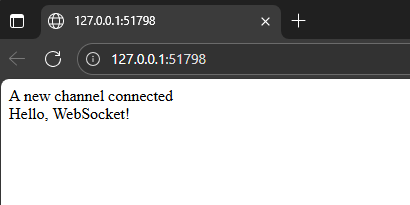
If you open up your network tab you can find the WebSocket connection and see the messages that are being sent back and forth.
.png)
The Conclusion
As exciting as BoxLang + WebSockets is PB&J’s legacy is likely safe. That being said, I think that you will agree with me when I say that the future of real time communication using SocketBox is quite promising.
There are many more topics I look forward to covering in the near future. Please stay tuned future articles in this series where we will cover
- Enabling cluster mode and deploying behind a load balancer (It is waaaay easier than you might think!)
- Security, authentication, and authorization using the Stomp protocol
- Ideas and examples of functionality you could add to your application using WebSockets
Want to Join the BoxLang Modern World?
Become a Pioneer
BoxLang is growing fast features are expanding, the ecosystem is thriving, and performance is turning heads. But the most exciting part? You can be part of shaping it from the very beginning.
The Pioneer Program is your gateway to early access, unmatched support, and unbeatable value. Here’s what you get:
- Everything in BoxLang+, and more:
- Professional support to get you running smoothly
- A dedicated Slack channel for direct access to our team, solve issues in seconds
- Priority handling for your feature requests and bug fixes
- Migration done with you, not just for you:
- Our engineers work alongside your team to migrate your apps end-to-end
- Guaranteed compatibility, we won’t stop until it works perfectly
- Big savings, no hidden tricks:
- At least 40% off your current licensing costs, locked in early, no surprise charges as you grow
<a style="margin-top:20px;" class="btn btn-outline-ortus btn-lg" href="mailto:boxlang@ortussolutions.com">Contact Us
Still Not Convinced?
If you’re unsure how BoxLang will work with your applications, or whether it can truly make a difference, we’ve made it easy to see the value for yourself, risk-free:
-
Free 30-Minute Consultation & App Diagnosis
We’ll review your applications, identify bottlenecks, and give you a clear modernization plan. You’ll see exactly where you can save time, reduce costs, and unlock new possibilities with BoxLang.
-
1-Year Free Non-Production License
Test-drive BoxLang Premium features in your own environment, no rush, no pressure. Explore advanced capabilities, experiment freely, and experience the benefits firsthand before making any commitments.
<a style="margin-top:20px;" class="btn btn-outline-ortus btn-lg" href="mailto:boxlang@ortussolutions.com">Contact Us
Join the BoxLang Community
Be part of the movement shaping the future of web development. Stay connected and receive the latest updates on surrounding anything BoxLang
Subscribe to our newsletter for exclusive content.
Follow Us on Social media and don’t miss any news and updates:
- https://newsletter.boxlang.io
- https://x.com/TryBoxLang
- https://www.facebook.com/tryboxlang
- https://www.linkedin.com/company/tryboxlang
- https://www.youtube.com/OrtusSolutions
- https://github.com/ortus-boxlang
Join the Ortus Community
Be part of the movement shaping the future of web development. Stay connected and receive the latest updates on, product launches, tool updates, promo services and much more.
Subscribe to our newsletter for exclusive content.
Follow Us on Social media and don’t miss any news and updates:



Add Your Comment