

One of my personal favorites of CommandBox is the introduction of step-by-step wizards for some complication creation processes like a new package or a new ColdBox application. It will take you by the hand and never let you go :) Here is the way to initialize a new package with our nice wizard:. First let's go into our interactive shell by typing box or opening the box binary.
mkdir myApp
cd myApp
init --wizard
This triggers the wizard and you will be asked a series of questions and finally create a box.json for you. Here is the wizard output:
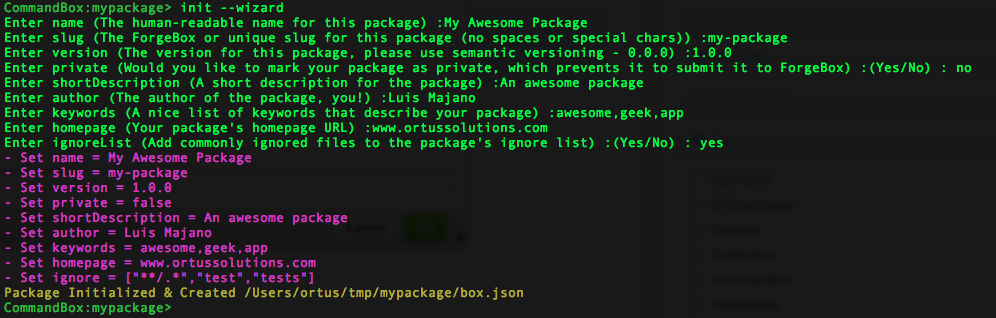
Then we can get the output of the file and verify it:
{
    "name":"My Awesome Package",
    "version":"1.0.0",
    "author":"Luis Majano",
    "location":"",
    "directory":"",
    "createPackageDirectory":true,
    "packageDirectory":"",
    "homepage":"www.ortussolutions.com",
    "documentation":"",
    "repository":{
        "type":"",
        "url":""
    },
    "bugs":"",
    "slug":"my-package",
    "shortDescription":"An awesome package",
    "description":"",
    "instructions":"",
    "changelog":"",
    "type":"",
    "keywords":"awesome,
    geek,
    app",
    "private":false,
    "engines":[
        {
            "type":"railo",
            "version":">=4.1.x"
        },
        {
            "type":"adobe",
            "version":">=10.0.0"
        }
    ],
    "defaultEngine":"",
    "defaultPort":0,
    "projectURL":"",
    "license":[
        {
            "type":"",
            "url":""
        }
    ],
    "contributors":[

    ],
    "dependencies":{

    },
    "devDependencies":{

    },
    "installPaths":{

    },
    "ignore":[
        "**/.*",
        "test",
        "tests"
    ],
    "testbox":{
        "runner":[
            {
                "default":""
            }
        ],
        "labels":[

        ],
        "reporter":"",
        "reporterResults":"",
        "bundles":[
            ""
        ],
        "directory":{
            "mapping":"",
            "recurse":true
        },
        "watchers":[

        ],
        "notify":{
            "emails":[

            ],
            "growl":"",
            "url":""
        }
    }
}



Add Your Comment