
Breaking the CFML Barrier: Going Serverless on AWS Lambda with BoxLang — by Dan Card
Like most in the CFML community, I’d heard about serverless for years but never dived into it for a host of reasons. One of these ( and a pretty major one! ) was an irrational avoidance of all things Java and being used to the ease of spinning up a CFML instance at other hosting locations. However, as I started to have more and more small projects and personal tools that were a help to my day-to-day workflow, the cost to have these projects “always on” in a running instance or on EC2 was slowly, if not rapidly, becoming too expensive. This economic incentive, and the advent of BoxLang, were enough to overcome my reservations and the results were definitely worth the experiment.
To date, I’ve ported about half a dozen CFML apps over to AWS Lambda using BoxLang and the sum total for running and using those projects has been literally $0. Just to be clear, the price tag of $0 has been for low traffic sites attached to other resources such as databases which would have to be paid for anyway, but the luxury of not having an EC2 or LightSail instance turned on 24x7 or having to remember to turn it on (or off!) to operate the app, has shown huge benefits including saving of hundreds of dollars.
What is AWS Lamba
In a nutshell, AWS Lambda allows you to upload your code, and it will run in a dedicated environment when, and only when, an event comes in to trigger your code to run. For example, when an http/s request comes in, Lambda will automatically launch the environment needed to run your code, execute your code and then quickly shut down the environment. You are only charged for the time that your app is running which can often be measured in milliseconds as opposed to hours.
For many CFML developers, this kind of thinking is foreign and hasn’t been part of the general psyche for the simple reason that historically, the engines haven’t spun up fast enough to make this approach a viable option. If the boot up time for your CFML engine is measured in minutes rather than seconds or less, the wait time of a “turn on at run time” configuration would be such a bad user experience as to make it unfeasible. Because of the lack of a native CFML environment in Lambda, for CFML devs to leverage it meant either having a good knowledge of Java or knowing how to pre-compile your CFML code into Java byte code. Since two of the ( many!! ) benefits of CFML were that a) it wasn’t Java and b) all code was automatically compiled either at startup or at run time allowing for very fast iterations, this made Lambda a non-starter, albeit one with the price of having to pay for “always on” hosting.
Enter BoxLang
BoxLang by its very nature keeps the benefits and overcomes the obstacles. The core BoxLang run time is under 10mb, so the startup time is incredibly fast, making the “spin up at run time” option feasible. The developer tool ecosystem is well developed so the ability to do things like pre-compiling code is easy and straightforward. Additionally, the prebuilt Lambda template which Ortus provides keeps the “make it easy” vibe and handles many of those steps so even the pre-compiling isn’t strictly necessary. Even the advent of a new tool – Gradle - was handled seamlessly with two commands in the terminal.
Prepping AWS Lamba
Lambda uses the vernacular of “Application”, which use many different AWS resources from DBs to logging and notifications – and “functions”; a self-contained code base running in only Lambda. We’re going to start with a bare bones BoxLang project and a minimal configuration Lamba function to get us going. The steps are going to be:
- Creating the function in the AWS Lambda console
- Downloading the BoxLang template
- Uploading the template to AWS
- Seeing the result of our code in a browser.
Creating the function in the AWS Console
-
Log into the AWS Console and go to the Lambda section
-
Choose the Region in which you want to store your function from the upper right. I’m in Boston so I chose Northern Virginia. As a side note, it was a bit surprising to me that I already had functions in my Lamba dashboard that had been automatically created through working with other AWS services.
-
Click on the “Create Function” button and choose the “Author from Scratch” option.
- Fill in your function name (can be anything complying with the rules on the screen)
- Choose Java 21 for the Runtime
- Choose either arm64 or x86_64.
- Keep the permissions the way they are for now.
- Under Additional configurations check to enable the Function URL. This will in turn ask about the type of Authentication to use. For now, choose NONE.
- Keep everything else the same and click on Create Function.
- After a moment, the settings for your function will appear.
- Click on the Code tab and go down to Runtime settings
- Edit the Runtime settings and set the Handler to “ortus.boxlang.runtime.aws.LambdaRunner::handleRequest”
What we just did:
Just like when you are running a web server locally or in a hosted environment, there are three things that need to exist
- The trigger – typically this is an http request hitting a web server
- The Handler – this is the code which is run when the trigger occurs
- The configuration of the underlying servers, OS, connectors and so on.
In our situation here, we set up our trigger to be the function URL which can be seen in the Function overview panel when we first open the function in the AWS console. If you go to that URL, you will probably see a blank screen with “Internal Server Error” because we haven’t made the underlying code. However, we did do all the configuration needed in order for the environment to run our code. AWS handles provisioning the server and we’ve told it to run whatever we upload in the Java 21 environment.
Creating our Handler in BoxLang
The BoxLang docs point us to a github template to get started with our Lamba Runner so we need to first either download or clone that from https://github.com/ortus-boxlang/bx-aws-lambda-template.
Local Steps
-
Open VSCode ( or other IDE ) pointing to an empty folder and clone the Ortus BoxLang Lambda template into it. If you have git already on your system, this can be done in the terminal with “git clone https://github.com/ortus-boxlang/boxlang-starter-aws-lambda.git ” or use whatever tool you would use normally.
-
After we create our BoxLang code, we are going to package it up using a program called Gradle. Don’t worry if you don’t have Gradle installed or have never used it.
-
Open a terminal window to the same folder and simply type “gradlew.bat”. This will install the version of Gradle needed to complete the project. Gradle is a build tool that will assemble our BoxLang project and create the distributions for us.
The BoxLang Code
- Open /src/main/Lambda.bx and look for the “run” function. The handler we set in the function configuration automatically executes this function when the trigger is activated. In the run function, add a message in the response.body.messages node.
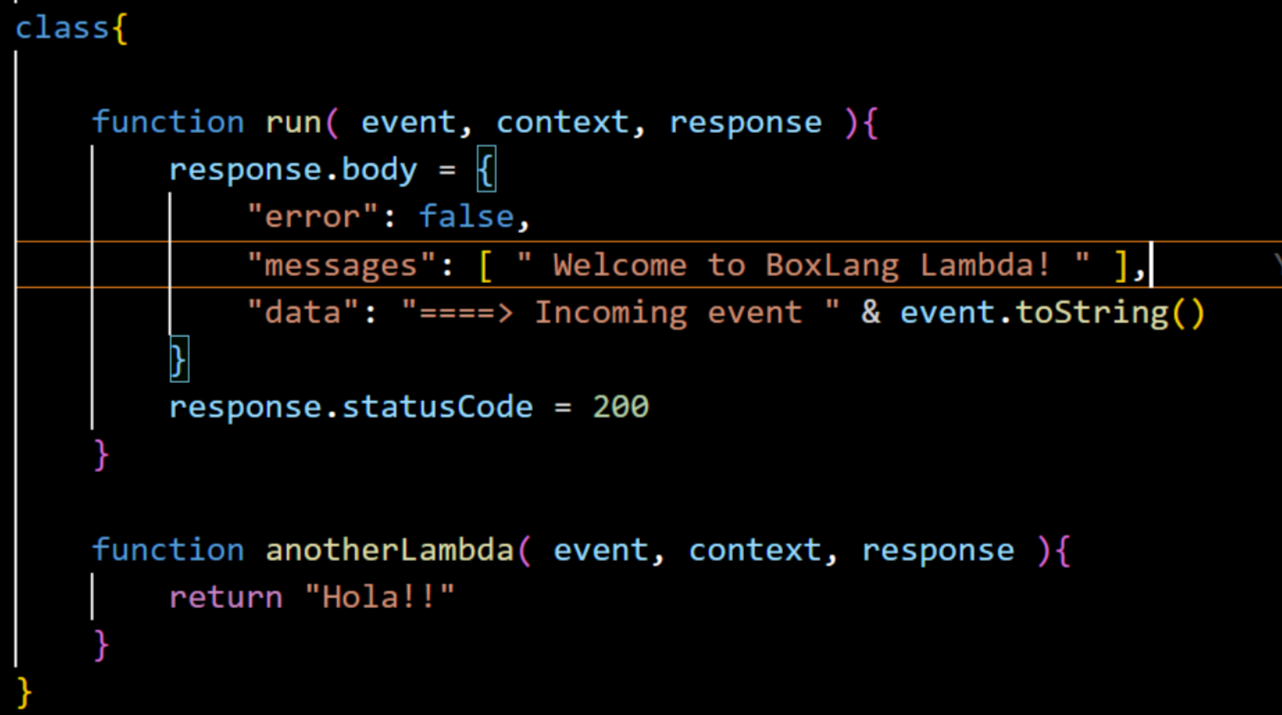
- There is one additional step because we are going so barebones. In the file /src/resources/boxlang.json, comment out the line

-
Back in your terminal type “gradle build”
-
Once the gradle build command is completed, look in the /build/distributions folder and see a new .jar and .zip files.
Uploading the code to AWS
- Go back to the AWS Lambda page for your function. On the Code tab, find the ¨Upload from¨ button, choose it and upload the zip file from build/distributions. You’ll see a green banner announcing when it finished processing.
- Open the Function URL link and you should see the JSON output including your message
What just happened: In a CFML application, when a page reloads all the CFML code which needs to be is parsed down to Java byte code. We’re essentially recreating that process here but in a few manual steps. We packaged all the relevant code into one zip file. When we uploaded it, the Lambda system read the included directives and did the compiling to Java Bytecode for us.
Conclusion
Obviously, this is just the beginning of Lambda development with BoxLang but hopefully it breaks the ice to try out what might be a new technology approach. Subsequent parts of this series will include issues such as more complex functions and configurations, routing, testing, using Forgebox libraries and so on but in the meantime – Have fun!!
Join the BoxLang Community ⚡️
Be part of the movement shaping the future of web development. Stay connected and receive the latest updates on Into the Box 2025, product launches, tool updates, and more.
Subscribe to our newsletter for exclusive content.
Follow Us on Social media and don’t miss any news and updates:
- https://x.com/ortussolutions
- https://www.facebook.com/OrtusSolutions
- https://www.linkedin.com/company/ortus-solutions-corp
- https://www.youtube.com/OrtusSolutions
- https://github.com/Ortus-Solutions
Join the BoxLang and CFML legends at Into the Box 2025. Let’s learn, share, and code together for a modern, cutting-edge web development future.




Add Your Comment